.svg)

AI use case: accounting automation agent
This use case presents the implementation of an accounting automation agent capable of automatically processing large volumes of repetitive financial documents.
It is intended for organizations wishing to reduce data entry time, improve data reliability, and refocus teams on higher value-added tasks.
For accounting firms and finance departments
The problem: time-consuming and unrewarding manual processing
Every month, your teams manually process hundreds of repetitive documents:
- Cash register tickets
- Supplier invoices
- Bank statements
- Expense reports
The typical process is as follows:
- Receive the document (email, scan, customer platform)
- Identify the type of room
- Extract relevant data
- Enter into the accounting software
- File the original
For a firm processing 1,250 Z tickets per month, this represents the equivalent of 3 FTEs mobilized on tasks with no added value.
The solution: an AI agent for accounting document processing
The solution is based on an AI document processing agent that automates the entire accounting chain:
- Ingestion
The agent retrieves documents from configured sources (dedicated email, shared folder, client API).
Classification Automatic identification of the type of part.- Extraction
Reading of key data (amounts, dates, VAT, references).
Transformation Conversion to the format expected by the target software.
injection Automatic transmission to Pennylane, Sage, Cegid, or any other accounting tool.
Human intervention is limited to ambiguous cases reported by the agent.
Real-life case: BDO France
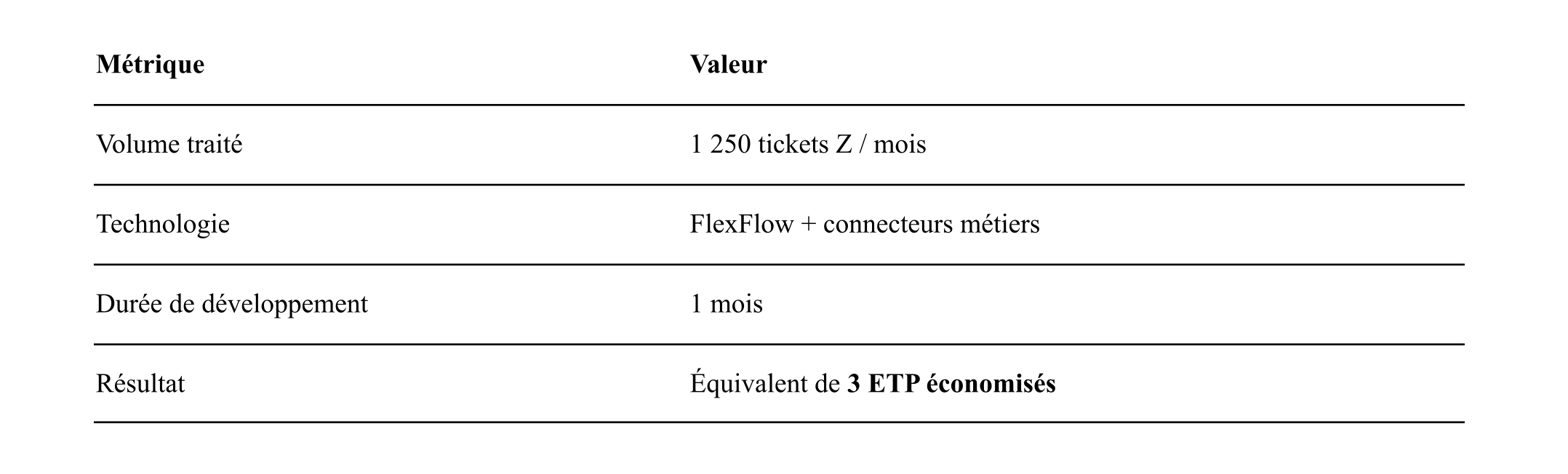
The main technical challenge was converting the files to ensure compatibility with the receiving software (Pennylane).
This issue was resolved within three weeks of development.
How does an accounting automation agent work?

Documents in cases of uncertainty are directed to an exception queue for human validation.
Concrete benefits measured after deployment
- 70 to 80% reduction in data entry time
- Error rate reduced by a factor of 10 (the agent does not get tired at 5 p.m.)
- 24/7 processing - Documents received in the evening are ready in the morning.
- Full traceability - Every action is logged.
What IT Systems brings to this AI use case
- Field experience
Deployment of this solution at BDO, with detailed knowledge of operational constraints and pitfalls. - Proficiency in accounting connectors
Pennylane, Sage, Cegid, as well as standard exchange formats (FEC, CFONB). - Custom development
As each firm has its own specific characteristics, the agent is tailored precisely to existing workflows and tools.
Technical requirements for deploying an accounting automation agent
- API access or import/export on the target accounting software
- Source documents in digital format (PDF, image, CSV)
- Recommended minimum volume: 500+ pieces/month (below this, the ROI is generally insufficient)
Implementation period
4 to 8 weeks, depending on the complexity of the flows and the number of sources to be connected.
→ Learn more: AI agents for businesses
Let's calculate the ROI on your actual volume together
Would you like to evaluate the concrete gains on your own accounting volumes? Request a study

.webp)