.svg)

Key Takeaways
- An IT bastion centralizes, secures, and tracks all privileged access to your IT system (administrators, external service providers, DevOps teams).
- Since NIS2 (October 2024), a privileged access management system has become a requirement for all SMEs classified as essential or important entities.
- 3 leading solutions in 2026: Azure Bastion (integrated with Microsoft 365, starting at 90 €/month), Wallix (French, 5 to 15 k€/year), CyberArk (enterprise, 15 to 50 k€/year).
- Measured ROI: According to Gartner 2026, a bastion reduces the risk of compromise via privileged credentials by 60% and cuts the average time to detect abnormal access by a factor of 4.
- Estimated budget for SMEs: 5 to 15 k€/year, all-inclusive, for 5–20 privileged users. Combine with MFA and a least-privilege policy for a comprehensive solution.
A single compromised administrator account can be enough to cripple an entire information system. This is precisely the scenario that the IT bastion is designed to prevent. By enforcing a single point of entry for all privileged access—administrators, contractors, technicians—it reduces the attack surface and ensures full traceability of every action.
This article explains how a bastion works, how to deploy it, and why it is explicitly required by the NIS2 and ISO 27001 standards.
1. What is an IT bastion?
An IT bastion server—also known as a jump server, relay server, or PAM (Privileged Access Management) —is a specially hardened server that serves as the sole point of entry to a system’s sensitive resources.
In practice: No administrator is allowed to connect directly via SSH or RDP to a production server. All connections must go through the bastion host, which authenticates the user, verifies their permissions, logs the session, and forwards it in encrypted form to the target.
The bastion answers a simple question: "Who did what, when, and from where?" Without a bastion, this question often remains unanswered after an incident.
2. Architecture of a bastion: complete diagram
The diagram below shows the architecture of an IT bastion: authorized traffic, blocked access, and connections to the SIEM.
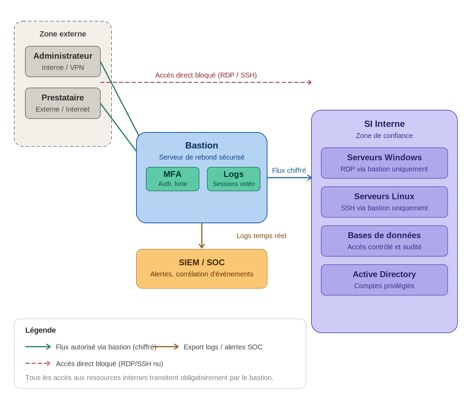
Architectural Diagram of an IT Bastion — IT Systems
Reading the diagram
- All users (internal administrators, external service providers) must access the system through the bastion.
- The bastion server requires strong authentication (MFA) and records video sessions.
- Direct RDP or SSH access to internal servers is blocked at the firewall level.
- The bastion transfers encrypted data streams to the target resources (Windows, Linux, databases, Active Directory).
- All logs are sent in real time to the SIEM for detection and correlation.
Privileged Access — IT Systems
Are your admin accounts
really under control?
Mapping privileged access, orphaned accounts, and active contractors—the audit takes just 30 minutes.
3. Key features of a bastion
3.1 Strong Authentication (MFA)
The bastion requires multi-factor authentication for all access. When combined with LDAP or Active Directory, it ensures that only authorized users can log in.
- TOTP (Google Authenticator, Microsoft Authenticator)
- X.509 certificates or SSH keys
- RADIUS Integration for Service Provider Access
3.2 Session Recording
Each session is recorded as a video stream and text logs (keyboard keystrokes). In the event of an incident, it becomes possible to replay exactly what happened.
IT Systems Field Support — Mid-sized Industrial Company (200 employees)
Background: Pre-certification audit for NIS2 — 47 admin accounts discovered.
Findings: 12 former service providers still had active access. 8 accounts had the password "Admin2023!". 3 service accounts were set to Domain Admin without justification.
Deployment: WALLIX Bastion + MFA in two weeks. 19 accounts revoked immediately.
Result: Passed the NIS2 audit three months later with no findings. Zero incidents in 12 months.
3.3 Privileged Account Management (PAM)
Most bastion hosts include a password vault feature. The passwords for service accounts are never visible to the user: the bastion host automatically enters the credentials during login.
- Automatic secret rotation (HashiCorp Vault compatible)
- Non-human service accounts — never directly exposed
- Ongoing inventory and audit of privileged accounts
4. Technical Specifications
4.1 iptables Rules — Block Direct Access
# Autoriser uniquement les flux en provenance du bastion (règles spécifiques EN PREMIER)
iptables -A FORWARD -s <IP_BASTION> -p tcp --dport 3389 -j ACCEPT
iptables -A FORWARD -s <IP_BASTION> -p tcp --dport 22 -j ACCEPT
# Block all other direct RDP and SSH connections to internal servers
iptables -A FORWARD -p tcp --dport 3389 -j DROP # Direct RDP blocked
iptables -A FORWARD -p tcp --dport 22 -j DROP # Direct SSH blocked
# HTTPS only for the bastion's web interface
iptables -A INPUT -p tcp --dport 443 -j ACCEPT
iptables -A INPUT -p tcp --dport 80 -j DROP
4.2 Deploying Apache Guacamole (open source)
version: '3'
services:
guacamole:
image: guacamole/guacamole:1.5.5
environment:
GUACD_HOSTNAME: guacd
MYSQL_HOSTNAME: mysql
MYSQL_DATABASE: guacamole_db
MYSQL_USER: guacamole_user
MYSQL_PASSWORD: <CHANGE_ME>
ports:
- '8080:8080'
guacd:
image: guacamole/guacd:1.5.5
mysql:
image: mysql:8
environment:
MYSQL_ROOT_PASSWORD: <CHANGE_ME>
MYSQL_DATABASE: guacamole_db
4.3 PowerShell — Inventory of Privileged Accounts
# List the members of the Domain Admins group
Get-ADGroupMember -Identity 'Domain Admins' | Select Name, SamAccountName
# Identify accounts with AdminCount=1 (potentially orphaned)
Get-ADUser -Filter {AdminCount -eq 1} -Properties AdminCount,LastLogonDate |
Select Name, SamAccountName, LastLogonDate, Enabled |
Sort LastLogonDate
5. Compliance with NIS2, GDPR, and ISO 27001
The NIS2 Directive (transposed into French law in 2024) requires critical and important entities to implement cybersecurity risk management measures, which explicitly include the management of privileged access.
| Reference Framework | Requirement met | What the bastion offers |
|---|---|---|
| NIS2 | Section 21 — Control of Privileged Access | Full traceability, mandatory MFA |
| RGPD | Section 32 — Data Security | Logging of access to personal data |
| ISO 27001 | A.9.4 — System Access Control | Centralized PAM, secret rotation |
| ISO 27001 | A.12.4 — Logging | Video sessions, time-stamped and signed logs |
6. ROI and Cost-Benefit Analysis
A security incident involving a compromised admin account costs an average of between €150,000 and €500,000 (investigation, remediation, business interruption, GDPR fines). By comparison, the initial cost of deploying a bastion server suitable for an SME or mid-sized company ranges from €10,000 to €25,000.
- 15% to 30% reduction in cyber insurance premiums (PAM compliance certificate)
- The average time to detect a security breach is reduced from 72 hours to less than 2 hours with a SIEM solution
- Passing a NIS2 or ISO 27001 audit without any findings regarding "privileged access"
7. On-premises Bastion vs. Cloud
The choice between an on-premises solution and a cloud-based solution depends primarily on the IT architecture, latency tolerance, and regulatory requirements.
| Criterion | On-premises | Cloud / SaaS |
|---|---|---|
| Latency | Low (local LAN) | Varies by hosting provider |
| Initial cost | Advanced (bachelor's degree and beyond) | Basic (monthly subscription) |
| Maintenance | At your expense | Managed by the publisher |
| Hybrid IS | Complex to expand | Azure Bastion with native Microsoft Entra ID support |
| Data sovereignty | Total | Depends on the contract / hosting |
8. FAQ — The 8 Most Frequently Asked Questions
What is the difference between a bastion host and a VPN?
A VPN encrypts a network tunnel and provides broad network access. A bastion host provides granular, session-by-session application access with logging. The two are complementary: the VPN for network access, and the bastion host for access to critical resources.
Mon équipe est petite (< 10 personnes). Est-ce utile ?
Yes. Small and medium-sized businesses account for the majority of victims of compromises involving admin accounts. An open-source solution like Apache Guacamole can be deployed in a matter of hours and doesn't require a dedicated team.
How long will it take to roll it out?
A basic deployment (Bastion + MFA + AD connection) takes 1 to 3 days. Full integration with SIEM, a password vault, and team training takes 2 to 4 weeks.
What happens if the bastion breaks down?
A properly architected bastion is deployed in a high-availability (active/standby) configuration. As a last resort, a documented break-glass procedure allows for emergency access, with immediate notification to the CISO.
How should non-human service accounts be managed?
Service accounts must be integrated into the PAM system with automatic secret rotation. HashiCorp Vault or CyberArk enable dynamic credential injection without ever exposing them in plain text within scripts.
Does Bastion slow down connections?
The added latency remains below 50 ms on a LAN. For remote access, the impact is negligible because the RDP/SSH session already has some latency. An improperly sized cloud bastion, however, can cause longer delays.
Which stronghold should I choose based on my profile?
- PME < 50 postes : Apache Guacamole (open source, gratuit)
- Companies with 50–500 employees: WALLIX Bastion, CyberArk Vendor PAM, BeyondTrust Remote Support
- Enterprise Accounts / Azure Cloud: Azure Bastion + Microsoft Entra PIM
- Telco/Industrial Environment: Claroty, Nozomi Networks withPAM module
What is the quantified ROI for an SME?
An incident involving the compromise of an admin account costs an average of €150,000 to €500,000. A bastion suitable for an SME has an initial cost of €10,000–€25,000, with a 15–30% reduction in cyber insurance premiums.
9. Why companies get hacked through admin accounts
Administrator accounts are the primary target for attackers for one simple reason: they grant access to everything. According to the 2023 Verizon DBIR report, more than 74% of data breaches involve a human factor, and stolen or weak credentials remain the leading cause of breaches.
In the case of ransomware, attackers aren't trying to crack complex encryption: they steal an admin password, gain access, and encrypt the data without being noticed.
Anatomy of a Ransomware Attack via an Admin Account
Here is the typical sequence of events observed in most incidents handled by incident response teams:
- Targeted phishing or credential stuffing. The attacker obtains the password for an admin account, often through a data breach or a brute-force attack on an exposed RDP server.
- Direct RDP connection. Without a bastion host, nothing blocks or logs this connection. The attacker is on the server in seconds.
- Lateral movement. Using a Domain Admin account, the attacker gains access to other servers, backups, and Active Directory. On average, this stage lasts 11 days before detection (source: Mandiant M-Trends 2023).
- Encryption and ransom demand. The backups are deleted first. The encryption process takes a few hours. The discovery is made the next morning.
A bastion would have blocked stage 2: without direct RDP access, the attacker cannot proceed, even with a valid password.
Bastion PAM — IT Systems
IT Systèmes deploys your
bastion and integrates it with your SIEM
WALLIX, CyberArk, or Guacamole, depending on your company size. NIS2 and ISO 27001 compliance included.
10. The 5 Most Common Mistakes Without a Stronghold
These five scenarios consistently arise in audits conducted prior to the deployment of a bastion host. Each one represents a potential attack vector.
Mistake 1 — Admin accounts shared among multiple people
Three technicians are using the same “administrator” account with the same password. When an incident occurs, it is impossible to determine who did what. In the event of an investigation, the company cannot provide any admissible evidence. This practice is prohibited by ISO 27001 (A.9.2) and is incompatible with NIS2 requirements regarding access control.
Mistake 2 — RDP access exposed directly to the Internet
Port 3389, which is exposed to the internet, is constantly scanned by bots. Shodan identifies hundreds of thousands of publicly accessible RDP servers every day. A weak or reused password is all it takes to gain access. Closing port 3389 at the firewall level, with access permitted only through the bastion host, completely eliminates this attack vector.
Error 3 — Vendor accounts that have never been revoked
A contractor works for six months and then leaves. Their account remains active. Without a centralized inventory of access rights, no one notices. In the audit mentioned in section 3.2, 12 accounts belonging to contractors who had left more than a year earlier were still active. A bastion with an approval workflow and limited access duration resolves this issue structurally.
Error 4 — Service accounts with Domain Admin permissions
A service account created for a business application inherits Domain Admin privileges “just to make it work.” Its password hasn’t been changed in four years. If this application is compromised, the attacker gains access to the entire domain. The rule: the principle of least privilege, automatic rotation of credentials via PAM, and removal of excessive privileges.
Mistake 5 — Failure to log admin sessions
Without session recording, a post-incident analysis amounts to little more than guesswork. It is impossible to know which command was executed, which file was modified, or which configuration was altered. Cyber insurers and regulatory authorities (ANSSI, CNIL) are increasingly requiring this traceability as part of a security audit.
11. Comparison of bastion hosts: WALLIX, CyberArk, BeyondTrust, Guacamole
The market for access management solutions covers a wide range: from open-source software that can be deployed in a matter of hours to full-scale PAM platforms for large enterprises. Here is a summary of each solution to help you choose based on the size and context of your IT system.
WALLIX Bastion
Profile: Mid-sized companies and large enterprises, regulated sectors (finance, healthcare, manufacturing). French software publisher, ANSSI-certified.
Key features: French-language web interface , native NIS2/ISO 27001 compliance, session video recording, built-in password vault, on-premises or SaaS deployment.
Limitations: Expensive licensing for small organizations. Integration can sometimes be complex in highly heterogeneous IT environments.
Estimated price: starting at €15,000 per year, depending on the number of users and the deployment method.
CyberArk Privileged Access Manager
Profile: Large enterprises, multinational corporations, complex hybrid cloud environments. A leader in the global PAM market.
Key strengths: Very broad functional coverage (management of secrets, cloud access, endpoints), native integrations with AWS, Azure, and GCP, a strong community, and comprehensive documentation.
Limitations: Long deployment process (several months), high cost, requires a dedicated team for administration. Designed for IT systems with 500+ users.
Estimated price: starting at €50,000 per year. Pricing based on a quote, depending on the scope of the project.
BeyondTrust Remote Support
Profile: Mid-sized company with frequent interactions with service providers and remote support. Particularly well-suited for environments involving frequent interactions with external parties.
Key features: Detailed management of contractor sessions (time limits, real-time approval), video recording, and a complete audit trail. User-friendly interface for non-technical users.
Limitations: The password vault is less feature-rich than CyberArk or WALLIX. Less suitable for OT/industrial environments.
Estimated price: starting at €10,000 per year, depending on the number of technicians and targets.
Apache Guacamole (open source)
Target audience: Small and medium-sized businesses with fewer than 50 employees, non-profits, and local governments with limited budgets. Also used as an entry point into larger systems.
Key features: Free , deployable via Docker in a matter of hours (see section 4.2), supports RDP, SSH, and VNC, web access without the need to install a client.
Limitations: No built-in password vault, no out-of-the-box video recording, technical administration required. Does not, on its own, meet NIS2 requirements for critical entities.
Cost: Free (Apache 2.0 license). Actual cost = time spent on deployment and internal maintenance.
12. Security checklist: What must be in place before granting admin access
This list covers the minimum controls required by NIS2 (Article 21) and ISO 27001 (A.9, A.12) for the management of privileged access. It can serve as a basis for an initial internal audit.
Authentication and Access
- MFA enabled on all administrator accounts (TOTP, certificate, or SSH key)
- No admin accounts shared among multiple people
- RDP and SSH access is permitted only through the jump server (ports 3389 and 22 are blocked for direct incoming traffic)
- Vendor accounts created with a specified access period and automatically revoked upon expiration
Secret Management
- Automatic rotation of service account passwords (frequency: every 30 days at most)
- No plaintext passwords in scripts, configuration files, or emails
- List of privileged accounts updated quarterly (see PowerShell script in section 4.3)
Logging and Detection
- All recorded admin sessions (video streams + keystroke logs) are retained for at least 12 months
- Bastion logs sent in real time to the SIEM system, with alerts for connections outside of scheduled hours
- Documented emergency procedure with automatic notification to the CISO upon activation
Compliance and Governance
- Administrator rights review conducted every 6 months (User Access Review)
- Least privilege principle applied: no service accounts with Domain Admin rights without written justification
- Annual test of the high-availability failover procedure for the bastion server
13. How IT Systèmes supports you
IT Systèmes works with mid-sized companies and SMEs to deploy and integrate privileged access management solutions: initial audit, bastion configuration, and integration with existing SIEM systems.
- Assessment of the current state: mapping of privileged accounts, risk analysis
- Deployment and configuration: bastion host, MFA, PAM, password vault
- SIEM/SOC Integration: Event Correlation, Real-Time Alerts
- Training for IT Teams and the Chief Information Security Officer
- NIS2, GDPR, and ISO 27001 Compliance Monitoring
→ Explore our cybersecurity offerings

.jpg)


.svg)