.svg)
If you have Microsoft 365 Business Premium, you already have a powerful EDR - Microsoft Defender for Business - at no extra cost. But an EDR alone, whether Microsoft, CrowdStrike or SentinelOne, is almost useless without 24/7 human supervision (MDR/SOC). This article factually compares Microsoft to third-party EDRs, explains the EDR/XDR difference, and demonstrates why investing in an MDR service is infinitely more critical than changing EDRs.
EDR: The endpoint protection your antivirus can't provide
EDR (Endpoint Detection and Response) represents a major evolution from traditional antivirus solutions. Whereas antivirus software compares known file signatures, EDR continuously monitors the behavior of your endpoints to detect and block advanced cyberattacks: ransomware, fileless attacks, and compromises via stolen credentials. It is one of the cornerstones of a comprehensive approach to protecting workstations and mobile devices.
According to the CESIN 2024 report, 92% of cybersecurity professionals have deployed EDRs, and 54% consider them "very effective". But not all BDUs are created equal, and above all: a single BDU is never enough.
Microsoft Defender for Business: EDR is already included in your Business Premium license
If your company uses Microsoft 365 Business Premium, you already have Microsoft Defender for Business - a complete EDR solution included in your subscription.
What Defender for Business contains
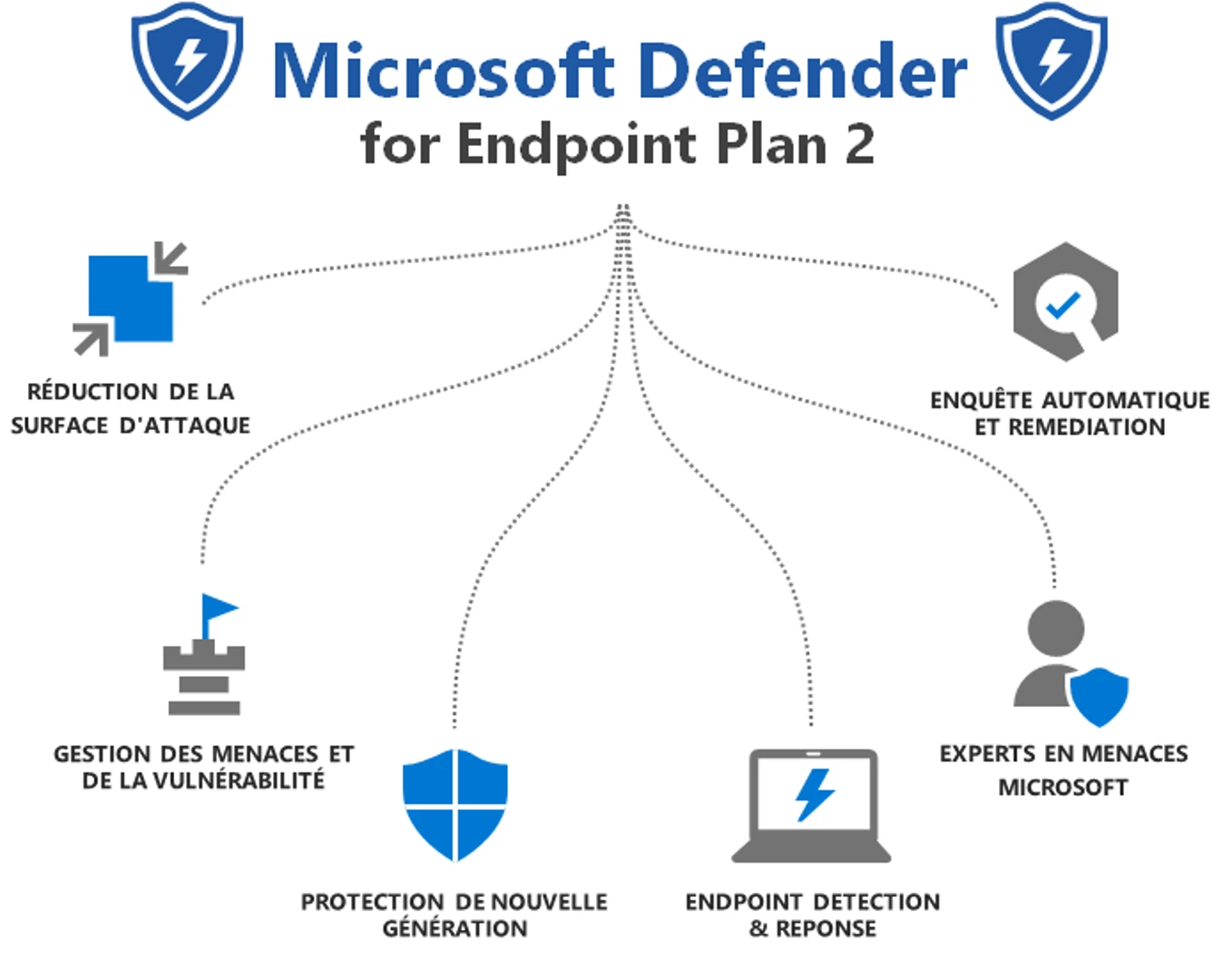
Microsoft Defender for Business offers :
- Next-generation protection: AI-powered behavioral antivirus
- Attack Surface Reduction (ASR): rules that prevent dangerous behavior (e.g., preventing Word from launching PowerShell)
- Comprehensive EDR: behavioral monitoring, detection of Indicators of Attack (IOA), automatic blocking
- Automated Investigation and Remediation (AIR): Automatic incident analysis and corrective actions
- Vulnerability Management: Identifying Software Vulnerabilities and Prioritizing Patches
- Cross-platform protection: Windows, macOS, iOS, Android
Simplified configuration, default security policies, guided onboarding - everything is designed for SMBs without advanced cybersecurity expertise.
The real limitations of Defender for Business
Unlike Defender for Endpoint Plan 2 (the enterprise version), Defender for Business has some important restrictions:
No advanced threat hunting: no Advanced Hunting (custom KQL queries). You are 100% reliant on Microsoft's automatic detections; you cannot create your own detection rules.
Limited device timeline: forensic information lacks depth. You cannot accurately trace the URL visited prior to the infection, nor track all the files modified by a malicious process.
Short data retention: EDR data is retained for a shorter period than on Plan 2, limiting the scope of retrospective investigations.
Limit of 300 users: beyond that, you must upgrade to Defender for Endpoint Plan 2.
Servers not included: Each Windows or Linux server requires an additional license at $3/month per instance, limited to a maximum of 60 servers.
No advanced native XDR: Business Premium includes access to the Microsoft Defender XDR portal, but without the full range of XDR features (advanced cross-domain correlation, advanced automation). To get the full XDR, you need the Microsoft Defender Suite for Business Premium add-on (around $5–$6 per user per month with an annual commitment; the price has been reduced since its launch—check the exact rate with your CSP reseller).
EDR, XDR, antivirus : quelles différences ?
Un antivirus bloque les fichiers malveillants déjà connus, en les comparant à des signatures. Un EDR surveille en continu le comportement des postes et des serveurs pour repérer et bloquer les attaques que l'antivirus ne reconnaît pas, puis aide à enquêter et à isoler un poste. Un XDR étend cette surveillance à la messagerie, aux identités, au cloud et au réseau, et relie les signaux pour reconstituer une attaque complète.
Antivirus : la protection par signatures
Un antivirus classique compare chaque fichier à une base de menaces connues. Il reste utile contre les logiciels malveillants courants, mais il voit mal une attaque nouvelle, une attaque sans fichier, ou un attaquant qui se sert des outils du système avec des identifiants volés. Les antivirus récents, comme celui inclus dans Microsoft Defender, ajoutent une analyse du comportement, mais sans l'enquête ni la réponse d'un EDR.
EDR: Endpoint protection only
EDR focuses exclusively on endpoints. It collects and analyzes data specific to workstations, servers and mobiles: running processes, network connections, modified files, suspicious activities.
Limitations of EDR: A typical ransomware attack travels through the network (data exfiltration), lands in an email inbox (phishing), and then infects the endpoint. EDR only detects the final stage—the one at the endpoint. The preceding stages (email, network) are invisible to it.
XDR: Extended Detection and Response
XDR (Extended Detection and Response) extends detection beyond endpoints to cover :
- Endpoints (traditional EDR)
- Network (traffic, abnormal connections)
- Email (phishing, BEC, malware in attachments)
- Cloud (workloads, identities, access)
- SaaS applications
XDR automatically collects and correlates data from these multiple sources to create a unified view of threats. Instead of generating 10 isolated alerts, it reconstructs the complete attack chain: "Phishing email → user clicks → malware download → execution on endpoint → lateral movement on the network".
Concrete benefits of XDR:
- Mean Time To Detection (MTTD) reduction through source correlation
- Reduce mean time to market (MTTI) with full context
- MTTR reduction through cross-domain automation
- Less false positives thanks to contextualization
According to Gartner, XDR represents the natural evolution of EDR - it doesn't replace it, it extends and enriches it.
Antivirus, EDR, XDR en un coup d'œil
- Antivirus : bloque les menaces connues sur le poste ; ne voit ni la messagerie ni les identités.
- EDR : surveille le comportement des postes et des serveurs, aide à enquêter et peut isoler un poste compromis.
- XDR : relie postes, messagerie, identités et cloud pour suivre une attaque de bout en bout.
Dans les trois cas, l'outil détecte ; il faut encore quelqu'un pour trier les alertes et agir. Pour la différence entre un service MDR et un SOC managé, voir notre article MDR : définition, périmètre et différence avec un SOC managé.
Microsoft XDR: What Do You Really Get?
With Microsoft 365 Business Premium, you have access to the Microsoft Defender XDR portal and certain basic correlation features between Defender for Business (endpoints) and Defender for Office 365 Plan 1 (email).
Limitations: no advanced correlation, no sophisticated cross-domain automation, no XDR threat hunting, no in-depth unified investigation.
To get the full XDR: the Microsoft Defender Suite for Business Premium add-on (~$5–6 per user per month, representing a savings of about 65% compared to purchasing licenses separately), which adds:
- Defender for Endpoint Plan 2
- Defender for Office 365 Plan 2
- Defender for Identity
- Defender for Cloud Apps
- Microsoft Entra ID Plan 2
- Full XDR correlation and advanced automation
Microsoft Defender for Business vs. Third-Party EDR: A Fact-Based Comparison
The list prices below are for reference only (subject to change); please check with the publishers for current prices before making any decisions.
Defender for Business vs CrowdStrike Falcon
CrowdStrike Falcon Pro: ~$99.99/device/year. CrowdStrike Falcon Enterprise: ~$184.99/device/year
CrowdStrike benefits:
- Cloud-native architecture with built-in global threat intelligence
- Threat hunting included in Enterprise (Falcon OverWatch)
- Indicators of Attack (IOA) using supervised and unsupervised machine learning
- Ultra-light agent with deployment in minutes
- Proven track record in MITRE ATT&CK tests
- Microsoft independence - useful if you want to avoid mono-dependence
CrowdStrike limits:
- Higher price than Defender for Business (already included in Business Premium)
- License complexity often criticized
- Requires expertise for optimal operation
- The CrowdStrike incident in July 2024 (8.5 million Windows devices crashed) demonstrated the risks of a faulty update.
When to choose CrowdStrike: You want the absolute best in behavioral detection and threat hunting; you prefer an independent, pure-play cybersecurity provider; and you have the resources to fully leverage its advanced capabilities.
Defender for Business vs SentinelOne Singularity
SentinelOne Singularity Control: ~$79.99/endpoint/year. SentinelOne Singularity Complete: ~$179.99/endpoint/year (including full EDR, extended retention, and AI assistant)
SentinelOne benefits:
- Autonomous AI agent operating locally - protection even when not connected to the cloud
- Automatic detection and remediation without cloud dependency
- Longer EDR data retention than CrowdStrike by default
- Intuitive interface and rapid deployment
- Good price/performance balance for SMEs
- MITRE ATT&CK 2024 tests: 100% detection of tested techniques
SentinelOne limits:
- Requires a reboot to activate (unlike CrowdStrike and Microsoft, which activate instantly)
- No automatic agent update (manual installation)
- Third-party threat intelligence
- No native identity protection (ITDR)
- Lower MDR results: 88.4% detection with MTTD of 47 minutes (MITRE Managed Services 2024)
When to choose SentinelOne: you have remote sites that require offline protection, you want a standalone solution that’s less complex than a full-fledged SOC, or you’re looking for good value for your money.
Defender for Business vs Trellix EDR
Trellix EDR: starting price ~$25,000 (pricing not publicly available; based on quote)
Trellix advantages:
- Behavioral detection reduces alert noise
- AI-driven analysis for investigations
- Integrated single-agent architecture
- Good for organizations with legacy McAfee/FireEye systems
Trellix limits:
- Opaque and generally higher pricing
- Less market share than CrowdStrike
- Less mature native XDR
When to choose Trellix: You already have a McAfee/FireEye ecosystem in place, and you want to minimize false positives through behavioral analysis.
The verdict: Is Microsoft Defender for Business competitive?
Pour une PME de <300 utilisateurs avec Microsoft 365 Business Premium :
Defender for Business is already included in your license (currently around €20 per user per month for all Business Premium plans). The marginal cost of EDR is €0.
Note: Starting July 1, 2026, Business Premium will include Copilot, and its price will increase (to approximately $32 per user per month). EDR will remain included at no additional cost, but please recalculate the total cost of the license after that date.
Comparison of annual cost per user (EDR only, excluding M365 license):
- Defender for Business (included): €0 additional charge
- SentinelOne Control: ~€70/year
- SentinelOne Complete: ~€158/year
- CrowdStrike Pro: ~88€/year
- CrowdStrike Enterprise: ~€162/year
In terms of capacity:
- Endpoint protection: comparable to third-party solutions for most SMB scenarios
- Behavioral detection: robust, based on Microsoft's global threat intelligence
- Automation: good (AIR), but limited compared to Plan 2
- Investigation: Limited vs. CrowdStrike or Plan 2—Sufficient for Standard Incidents
Verdict : Defender for Business offre un excellent rapport valeur pour une PME de <300 utilisateurs. Activez et configurez correctement Defender for Business avant d'investir dans un EDR tiers.
When a third-party BDU is justified:
- Need advanced expert threat hunting beyond Defender Plan 2
- Specific regulatory requirements (third-party certifications required)
- Deliberate multi-vendor strategy (defense-in-depth)
- Critical offline protection (disconnected sites without cloud connectivity)
- Caution following a Microsoft incident or a desire for technological independence
And for companies >300 users?
Microsoft remains highly competitive in the enterprise:
Microsoft 365 E3 and E5 licenses include Defender for Endpoint, and Microsoft 365 E5 even includes Defender for Endpoint Plan 2 - the full version with advanced threat hunting, advanced hunting (KQL queries), full timeline, 6 months data retention.
Microsoft 365 E3 (~€37 per user per month, price prior to Microsoft's rate increase on July 1, 2026):
- Includes Defender for Endpoint Plan 1 (basic endpoint protection)
- To get Plan 2: Microsoft Defender Suite add-on or upgrade to E5
Microsoft 365 E5 (~€57 per user per month, price prior to Microsoft's price increase on July 1, 2026):
- Includes complete Defender for Endpoint Plan 2
- Complete Microsoft XDR (email correlation, endpoints, identity, cloud apps)
- Threat analytics, advanced hunting, automated investigation & response
- Microsoft Threat Experts available as an add-on
Pricing note: As of July 1, 2026, the E3 and E5 base rates will increase (E3 ≈ €40.80, E5 ≈ €62.80 excluding tax for France). The calculations below are based on the previous rates; please recalculate after that date.
Annual cost comparison for 500 users (pricing plan prior to July 2026):
Microsoft option E5:
- 500 users × €57/month = €28,500/month = €342,000/year (includes Endpoint Plan 2, full XDR, Office 365, Teams, etc.)
- Outsourced MDR: 500 × €10/month = €5,000/month = €60,000/year
- Total: €402,000/year
CrowdStrike Enterprise option:
- Microsoft 365 E3 licenses: 500 × €36 = €18,000/month = €216,000/year
- CrowdStrike Enterprise: 500 × €162/year = €81,000/year
- Outsourced MDR: €60,000/year
- Total: €357,000/year
SentinelOne Complete option:
- Microsoft 365 E3 licenses: €216,000/year
- SentinelOne Complete: 500 × €158/year = €79,000/year
- Outsourced MDR: €60,000/year
- Total: €355,000/year
Verdict for >300 users:
Microsoft E5 is still very competitive because you get :
- Full EDR Plan 2 (CrowdStrike/SentinelOne equivalent in functionality)
- Built-in native XDR
- Advanced email protection (Defender for Office 365 Plan 2)
- Identity protection (Defender for Identity)
- Cloud apps protection (Defender for Cloud Apps)
- All the Microsoft productivity suite
For a company already part of the Microsoft ecosystem with E3, upgrading to E5 or adding the Defender Suite is often more cost-effective than a third-party EDR solution, especially given the native integration and reduced complexity. This is typically the kind of decision that should be made with the guidance of a consultant.
Third-party BDUs remain relevant for:
- Deliberate multi-vendor strategy
- Need for specific features (e.g., SentinelOne offline protection)
- Third-party certification requirements
- Dominant non-Microsoft environments (Linux/macOS heavy)
The truth that nobody talks about: an EDR without an MDR or SOC is practically useless
Whatever EDR you choose - Microsoft, CrowdStrike, SentinelOne, Trellix - the reality is stark: without 24/7 expert human supervision, your EDR is largely ineffective.
The problem: alerts without a pilot
An EDR generates hundreds or even thousands of alerts every month. Without SOC or MDR :
- No one sorts through them: the real threats get lost among the false positives
- No one is investigating: a "suspicious behavior" alert requires a contextual analysis
- No one responds: detection is useless without prompt remediation
- No one is hunting: Advanced Persistent Threats (APTs) require proactive threat hunting
Cyber attacks don't stop at 6pm on Fridays
The reality on the ground: cybercriminals operate 24/7. Ransomware is often deployed on weekends or at night to maximize the damage before detection. An attack launched on Friday night at 10 p.m. and detected on Monday morning at 9 a.m. had 59 hours to spread, encrypt your data, and exfiltrate your critical information.
Without continuous monitoring:
- Weekend BDU alerts remain unprocessed until Monday
- A night-time compromise can paralyze your business in the morning
- Attackers take advantage of off-peak times to advance unopposed
- Average detection time soars without 24/7 monitoring
With MDR 24/7:
- Continuous human surveillance, even at 3 a.m. on a Sunday
- Immediate response to critical incidents in less than 15 minutes
- Escalate to your teams only if necessary
- Contain threats before they spread
This is exactly why outsourced MDR is so critical for small and medium-sized businesses: you get expert analysts monitoring your systems while you sleep, without having to hire three analysts to staff a 24/7 shift schedule in-house. It’s one of the core components of our managed services and IT outsourcing offerings.
OMG: The Missing Brick
MDR (Managed Detection and Response) services combine :
- 24/7/365 monitoring by certified SOC analysts
- Smart triage: eliminating false positives, prioritizing real threats
- Forensic investigation: in-depth analysis of incidents
- Guided response: coordinated remediation, incident response playbooks
- Proactive threat hunting: actively searching for latent threats
- SIEM/SOAR Integration: Correlation with Other Security Sources
Figures that speak for themselves
According to cybersecurity experts (Orange Cyberdefense, Silicon.fr April 2025, IMS Networks):
- EDR requires a dedicated or managed SOC to be effective
- 81% of companies use an EDR (CESIN 2022), but many without an adequate SOC
- Attackers are increasingly able to disable unsupervised BDUs
- The average time to detect a violation is 277 days without active supervision.
Cost of an MDR service
Outsourced MDR service: €5 to €15 per endpoint/month depending on service level
- Basic Micro-SOC: ~€5-8/endpoint/month
- Standard MDR: ~10-12€/endpoint/month
- MDR premium with threat hunting: ~€15-20/endpoint/month
Internal SOC:
- 3 analysts minimum (24/7 coverage): ~€200,000/year
- SIEM/SOAR tools: €20,000 - €100,000/year
- Continuing education: €10,000 - €30,000/year
- Total: €230,000 - €330,000/year minimum
For an SME with 50-200 users, outsourced MDR is infinitely more cost-effective.
A clear statement
EDR alone is based on a "presumption of compromise"—it acts after the attacker has gained access. EDR solutions rely on post-incident remediation, which means that attackers are already inside the network by the time alerts are triggered.
An EDR without an MDR = a smoke detector without firefighters.
Our strategic recommendation for SMEs
Scénario 1 : PME <300 utilisateurs avec Microsoft 365 Business Premium
What you already have:
- Microsoft Defender for Business (EDR)
- Defender for Office 365 Plan 1 (basic email protection)
- Defender XDR portal access (limited functionality)
Recommended strategy:
Step 1 - Activate and configure:
- Deploy Defender for Business on ALL endpoints
- Configure Attack Surface Reduction (ASR) policies
- Activate AIR (Automatic Investigation and Remediation)
- Configure alerts to your ticketing tool
Step 2 - Subscribe to an MDR:
- Outsourced Micro-SOC service: €5-10/endpoint/month
- 24/7 monitoring, alert triage, guided response
- This is the critical investment - don't neglect it
Step 3 - Evaluate add-ons if the budget allows:
- Microsoft Defender Suite for Business Premium (~$5–$6 per user per month) if you need full XDR capabilities
- Server licenses ($3/server/month) for your mission-critical servers
Realistic total cost for 50 users:
- Microsoft 365 Business Premium: ~€1,000/month (already paid)
- Server licenses (5 servers): ~$14/month
- MDR service: 50 × €8 = €400/month
- Total EDR+MDR Security: ~€414/month for effective protection
Scenario 2: Company with more than 300 users
Choice A - Microsoft E5 (recommended if already Microsoft):
- Microsoft 365 E5: Defender for Endpoint Plan 2 included
- Full native Microsoft XDR
- Excellent integration with your existing ecosystem
- Outsourced MDR or in-house SOC, depending on the size
- Advantage: all-in-one, less complex, competitive overall cost
Choice B - Microsoft E3 + Defender Suite:
- Microsoft 365 E3 (less expensive)
- Microsoft Defender Suite add-on to get Plan 2
- Good option if you don't need full E5 functionality
- Outsourced MDR or in-house SOC
Choice C - Third-party BDU (if specific requirements):
- Microsoft 365 E3 for Productivity
- CrowdStrike Enterprise or SentinelOne Complete for EDR
- Advantages: vendor independence, pure-player expertise, specific certifications
- Cost: similar to E5 but with multi-vendor complexity
- Outsourced MDR or in-house SOC mandatory
Choice D - Hybrid approach (high security):
- Microsoft E5 for standard endpoints
- CrowdStrike or SentinelOne for critical assets (two-tier approach)
- Unified MDR covering both solutions
- Maximum defense-in-depth approach
Scenario 3: Regulatory requirements or high security
Defense-in-depth approach:
- Full Microsoft XDR (E5 or Defender Suite)
- Third-party EDR on critical assets (two-tier)
- In-house SOC with tier 2/3 analyst
- MDR outsourced tier 1 + internal escalation
- Central SIEM (Sentinel, Splunk) with multi-source correlation
the winning formula
Microsoft Defender for Business représente un excellent point de départ pour les PME <300 utilisateurs. Il offre des capacités EDR solides, incluses dans Business Premium, sans coût additionnel de licence.
BUT: An EDR solution alone—whether it’s from Microsoft, CrowdStrike, or SentinelOne—is never a complete defense.
The winning equation for SMEs:
Microsoft Defender for Business EDR (already paid for) + outsourced MDR/Micro-SOC service (€5–15 per endpoint per month) + incident response training for teams = effective protection against modern cyber threats.
For organizations with more than 300 users or advanced requirements:
Tier 1 EDR (Microsoft Plan 2, CrowdStrike, SentinelOne) + internal SOC or premium outsourced MDR + XDR for cross-domain correlation + proactive threat hunting = a mature defense-in-depth strategy.
EDR vs. XDR: What’s Next?
- EDR: protects your endpoints. Necessary, but not sufficient on its own.
- XDR: Extends protection to email, the network, the cloud, and identity. Correlates signals to provide a unified view. It’s the natural next step as your cybersecurity maturity grows.
- MDR: turns detection (EDR/XDR) into an effective response through 24/7 human expertise. This is the absolutely critical component.
The real question is not "which BDU to choose?" but "how to transform detection into effective response?"
And this solution necessarily relies on human expertise—whether in-house (SOC) or outsourced (MDR). All of this is part of a comprehensive cybersecurity and compliance strategy.
Don't let your Microsoft EDR sleep in your license. Activate it. Configure it. And above all: link it to a competent MDR service.
IT Systèmes offers:
- Microsoft Defender for Business audit and deployment
- Optimal configuration of EDR security policies
- Managed Micro-SOC and MDR services for SMEs
- Migration to Microsoft or third-party XDR solutions
- Incident response training for teams
Contact us for an audit of your endpoint security posture and a recommendation tailored to your business challenges.
Frequently asked questions
Quelle différence entre un antivirus et un EDR ?
Un antivirus bloque les fichiers malveillants déjà connus grâce à des signatures. Un EDR surveille en continu le comportement des postes et des serveurs pour repérer les attaques nouvelles ou sans fichier, aide à enquêter et peut isoler un poste compromis.
Quelle différence entre un EDR et un XDR ?
L'EDR protège les postes et les serveurs. Le XDR étend la détection à la messagerie, aux identités, au cloud et au réseau, et relie ces signaux pour reconstituer une attaque complète au lieu de produire des alertes isolées.
EDR ou XDR : que choisir pour une PME ?
Une PME équipée de Microsoft 365 Business Premium dispose déjà d'un EDR, Microsoft Defender for Business. Le XDR complet devient utile quand on veut relier postes, messagerie et identités ; dans les deux cas, il faut prévoir qui exploite les alertes.







.svg)