.svg)
You’ve probably interacted with a chatbot on a website, received an automated reply to an email, or answered a call handled by a synthetic voice capable of scheduling an appointment. Behind these experiences, there’s often a chatbot.
But what exactly is a conversational agent? How does it differ from a simple chatbot? And, more importantly, what concrete benefits does it offer to an SME or an IT department looking to improve operational efficiency?
In this article, IT Systèmes provides a clear definition, an overview of how it works technically, real-world use cases, and criteria for choosing the right solution.
1. Definition: What is a chatbot?
A chatbot is a computer program capable of conducting a conversation with a human user in natural language—either in writing or verbally—in order to answer their questions, perform tasks, or guide them through a process.
Unlike a form or a drop-down menu, a chatbot interprets the user's intentions (a process known as natural language processing, or NLP) to generate a relevant and context-appropriate response.
Simple definition: A chatbot is a piece of software that understands what you say (or type) and responds intelligently, just as a human conversation partner would.
The term "conversational agent" is often used interchangeably with "chatbot," but it actually refers to a broader and more sophisticated concept, which we will explore in detail.
2. How does a chatbot work?
A chatbot relies on several layers of technology that work together:
2.1 Natural Language Processing (NLP / NLU)
The first step is to understand what the user is saying. The NLU (Natural Language Understanding) module analyzes the text or voice to extract:
- intent (what does the user want?)
- entities (what key information is included: a date, a name, a product?)
- the context (is this a one-off question or part of an ongoing conversation?)
2.2 The dialogue engine
Once the intent has been identified, the dialogue engine determines the appropriate response. Depending on the agent’s sophistication, this can range from a simple predefined response to dynamic text generation using a language model (LLM).
2.3 Integration with information systems
This is where the chatbot truly shines in a business setting: it can be integrated with your business tools (CRM, ERP, databases, calendars, ticketing systems) to retrieve real-time information or trigger actions.
- Check the status of an order in an ERP system
- Create a ticket in an ITSM tool
- Qualify a prospect and add them to a CRM
- Schedule an appointment in a shared calendar
2.4 Natural Language Generation (NLG)
Finally, the agent formulates its response in natural language, clearly and in a way that fits the context. Modern agents based on large language models (such as GPT-4 or Claude) produce particularly fluid and nuanced responses.
3. Conversational agent vs. chatbot: What are the differences?
People often confuse conversational agents with chatbots. Here’s how to tell them apart:
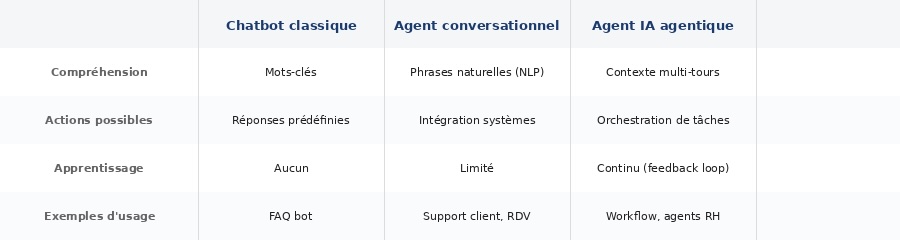
In short: all chatbots are conversational agents, but not all conversational agents are simply chatbots. Modern conversational agents are smarter, more integrated, and capable of much richer interactions.
4. The main types of chatbots
Text-based chatbot
The most widely used. It can be integrated into a website, mobile app, or messaging platform (Teams, Slack, WhatsApp). Ideal for customer support, lead qualification, or internal team support.
Voice chatbot
Based on speech recognition and synthesis, it enables interactions over the phone or through voice assistants. AI-powered phone chatbots are rapidly gaining traction for handling incoming calls, scheduling appointments, and sending automated reminders.
AI chatbot (based on LLM)
Next-generation AI chatbots are powered by large language models (LLMs). They understand complex queries, maintain the flow of long conversations, and generate nuanced responses. They can be fine-tuned using your business data to ensure maximum relevance.
Multimodal chatbot
The most advanced agents combine text, voice, images, and structured data within a single interface. This is particularly true of certain enterprise assistants that support employees across various channels.
5. Business Use Cases
Chatbots aren't just for large companies. Here are the most common uses for small and medium-sized businesses:
Customer Support and After-Sales Service
This is the most common use case. The chatbot handles frequently asked questions around the clock, escalates complex cases to a human agent, and significantly reduces the number of tickets that need to be processed manually.
Observed result: up to a 40% reduction in incoming inquiries regarding Level 1 issues.
Details about this use case are available in our dedicated article: AI Agent for Customer Service.
Lead Qualification and Sales Appointment Scheduling
A chatbot integrated into your website can qualify visitors (budget, project, timeline), automatically populate your CRM, and suggest an appointment slot in your sales representative’s calendar—all without human intervention.
Internal IT Support (Help Desk)
For IT teams, a chatbot integrated with an ITSM tool allows employees to report an incident, reset a password, or get a technical answer without having to contact the IT department for every routine request.
IT Systèmes has implemented this type of solution for several clients: a Level 1 help desk agent integrated into Microsoft Teams automatically handles 40 to 50% of recurring tickets. Learn more about this use case →
Human resources
Onboarding new employees, answering common HR questions (time off, pay stubs, procedures), and collecting feedback: AI chatbots can automate a large portion of the repetitive interactions between HR and employees. Learn more in our article “AI Chatbots for HR.”
Specific sectors
- Accounting firms: scheduling appointments, sending reminders for tax documents. See our article on AI Accounting Agents.
- Law firms: automated contract analysis, document search within the EDM system, and case classification. IT Systèmes supports law firms such as Gide, Bredin Prat, and Littler with these use cases. See the contract analysis use case → See the document search use case →
- Industry: technical support for production lines, handling of non-conformities; Local government: providing information to residents, processing routine requests
6. AI Chatbot: Toward Agent-Based AI
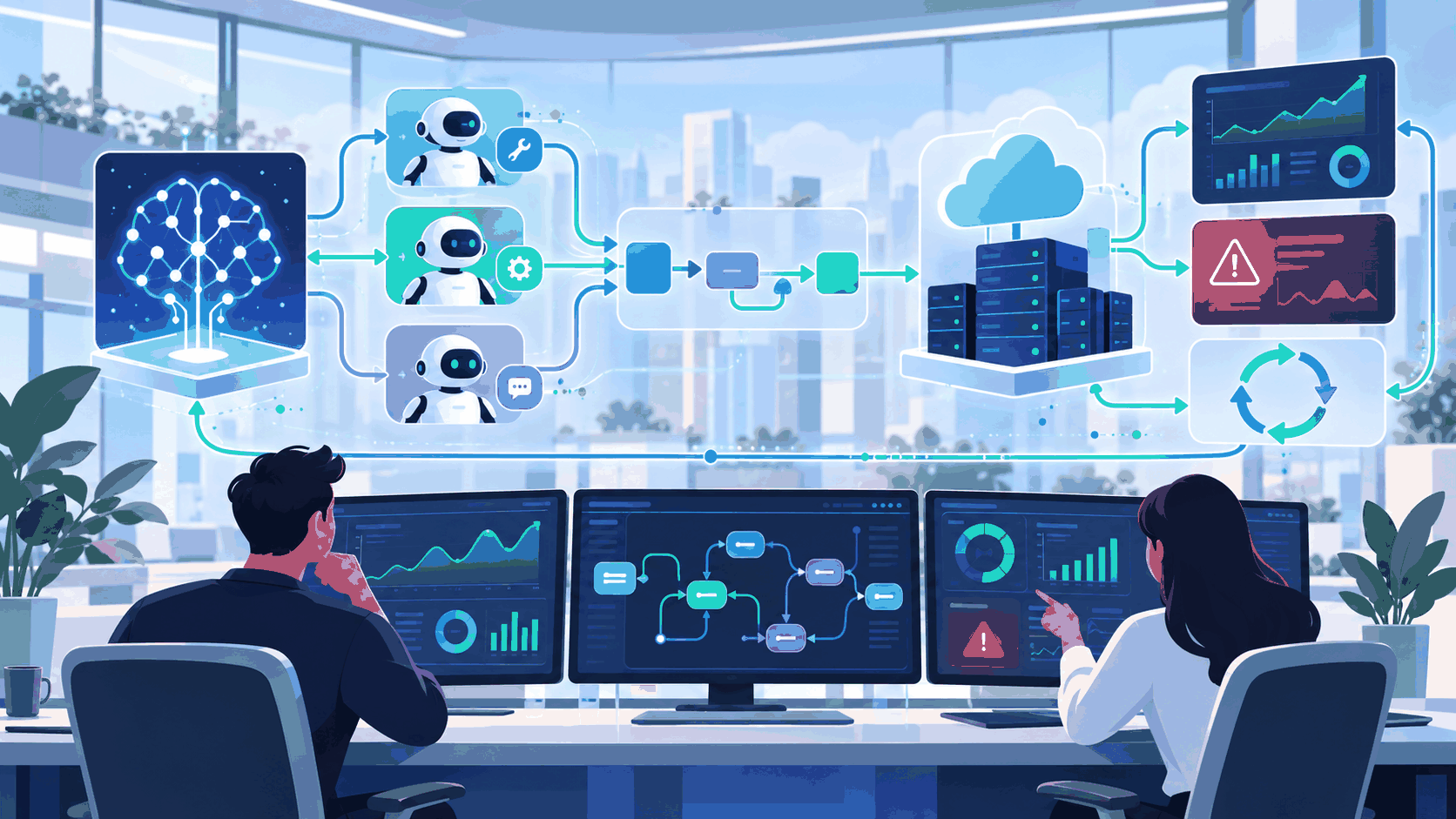
Traditional AI chatbots answer questions and perform simple tasks. But a new generation is emerging: so-called "agent-based" AI agents.
An agent is capable of breaking down a complex goal into subtasks, independently utilizing multiple tools or systems, and adjusting its plan based on interim results—without a human having to approve each step.
Example: An agent responsible for “preparing a new client’s onboarding” can create the file in the CRM, send the welcome email, schedule the initial meetings, AND generate the initial quote—all in a coordinated and autonomous manner.
While agent-based AI represents the next step, the AI chatbot remains an essential building block. Starting by deploying a chatbot that’s fully integrated with your systems lays the groundwork for the intelligent automation of tomorrow.
7. How do you choose a chatbot?
The chatbot market is crowded. Here are the criteria that really matter:
- Integration capabilities: Can it connect to your existing tools (CRM, ERP, ITSM)?
- NLP quality: Does it understand French, including its nuances, abbreviations, and industry-specific contexts?
- Customization: Can it be trained using your specific data and processes?
- Human supervision: Is there a seamless handover process to a human agent in the event of a complex situation?
- Security and GDPR Compliance: Is the data being processed in accordance with European regulations?
- Total cost of ownership: Beyond the license, what are the costs of integration, maintenance, and upgrades?
A free or low-cost chatbot may seem appealing, but it often has limited integration and customization capabilities. For business use, working with an expert service provider ensures a reliable and scalable deployment.
8. IT Systèmes supports you in deploying your chatbot
At IT Systèmes, we help small and medium-sized businesses design, integrate, and operate custom chatbots—connected to your existing IT systems.
Our approach: We start with your actual business needs, not a demo. We analyze your communication workflows, identify high-impact use cases, and deploy a solution that integrates with your IT systems—CRM, ERP, ticketing tools, or communication platforms.
- Audit and Scope Definition for Your Chatbot Project
- Custom development and integration (APIs, connectors, LLMs)
- Training and skills transfer for your teams
- Oversight and continuous improvement
To learn more, check out our range of custom AI agents for businesses.
Do you have an automation or AI-powered customer service project? Our experts will call you back within 24 hours to discuss it →
A conversational agent is much more than just a chatbot. It is a technological building block capable of understanding natural language, integrating with your information systems, and automating complex interactions—from customer support to sales qualification and internal IT support.
With the rise of AI chatbots based on large language models (LLMs), the possibilities are expanding significantly. And for companies looking to take things further, agent-based AI paves the way for end-to-end automation of business processes.
To get started, the first step is often straightforward: identify a high-volume, recurring workflow and deploy a well-integrated chatbot. This is exactly where IT Systèmes can help you.





.svg)