.svg)
What is SharePoint and why are you already paying for it without using it?
SharePoint is Microsoft's enterprise document management and collaboration platform, natively integrated into the Microsoft 365 ecosystem. Launched in 2001, it enables users to create internal websites, manage documents, automate business processes and facilitate collaborative working.
SharePoint is included in Microsoft 365 Business Standard, Business Premium, E3 and E5 licenses, representing an investment of several dozen euros per user per month that you're already paying for. Yet the majority of businesses only exploit the bare minimum of its capabilities: basic file storage and sharing.
Standard Features (What Everyone Uses)
- File storage and sharing
- Team collaborative spaces (Team Sites)
- Synchronization with OneDrive
- Integration with Teams
- Basic document versioning
- Up to 250 people can work simultaneously on the same document.
The problem: stopping there means using only 20% of a solution for which you pay 100%.
Unknown Advanced Capabilities (Yet Already Included)
1. Professional Electronic Document Management (EDM)
SharePoint offers a true enterprise EDM with features that replace costly third-party software:
Customized metadata: Instead of multiplying folders and sub-folders, you tag each document with properties (customer, contract type, due date, status, department, etc.). Result:
- Ultra-precise searches in seconds
- Views filtered and sorted automatically
- Workflows triggered by values
- Logical organization independent of physical tree structure
Content types: Create pre-formatted document templates with integrated metadata ("Invoice", "Sales contract", "Expense report") to standardize document management.
Enterprise search: Search engine that indexes content, metadata and even text in PDFs and images.
2. Ultra-Granular Rights Management
SharePoint lets you manage permissions at several levels: by site, by library, by folder, and even by individual document. You define :
- Who can consult
- Who can modify
- Who can approve
- Who can share
- Temporary permissions (access until a specific date)
Case in point: A sales rep only accesses customer files, the CFO automatically validates invoices >€10,000, HR documents remain strictly compartmentalized by department.
3. Modern, customizable SharePoint sites
Beyond basic team sites, SharePoint allows you to create :
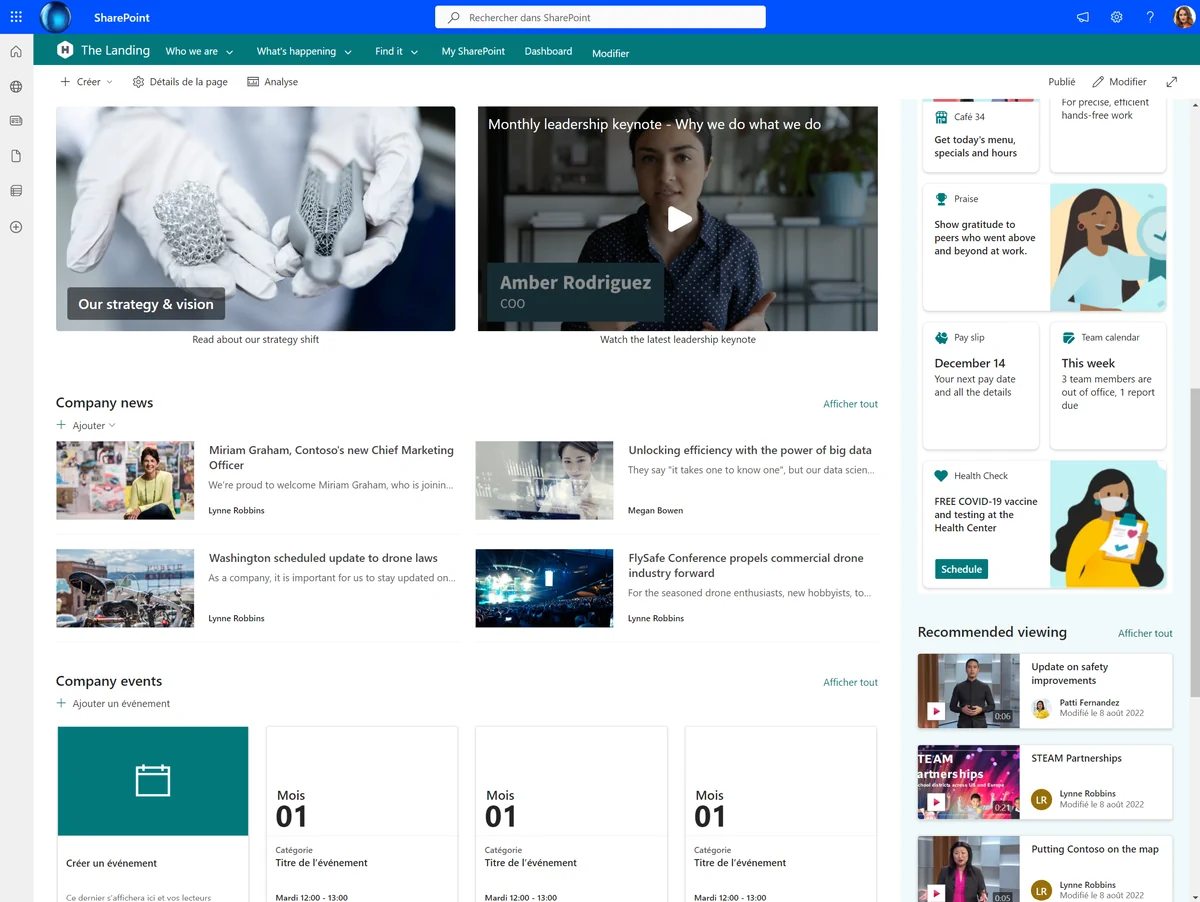
Communication Websites: Modern intranets with responsive design, Hero Web Parts for visual content, dynamic news.
Hub Sites: Architecture of interconnected sites sharing navigation, branding and unified search for the entire organization.
Custom sites: Via SharePoint Framework (SPFx), development of customized components in React/TypeScript, full integration with corporate identity.
4. Business automation with Power Automate
SharePoint integrates natively with Power Automate (also included in M365):
- Multi-level approval workflows
- Automatic notifications (email, Teams, SMS)
- Automatic file copying/moving according to rules
- Data extraction from documents
- Integration with third-party systems (CRM, ERP, accounting)
- Automatic document generation from templates
- Automatic archiving in a blob of all unopened data for x months/day/year.
Example: When a quotation is signed, the system creates a structured customer file, notifies the sales rep, generates the contract, updates the CRM and sends an email to the prospect.
5. APIs and Developer Integrations
SharePoint REST API and Microsoft Graph enable :
- Development of connected business applications
- Bi-directional integration with third-party applications
- Automation via PowerShell
- Creating connected Power BI dashboards
- Synchronization with external databases
6. Professional features often overlooked
SharePoint lists: lightweight relational databases with customizable forms, automatic calculations, conditional views. Free alternative to many business applications.
Advanced version control: up to 50,000 major and 511 minor versions per document, approval required before publication, restoration at any time.
Automated retention strategies: Legal retention according to regulations (RGPD, industry obligations), automatic deletion after deadlines.
Real-time co-editing: several users can simultaneously edit the same Office document without conflict.
Critical technical limits to be aware of
Let's be clear about the real constraints of SharePoint:
Storage limits
Each organization receives a basic 1 TB + 10 GB per licensed user. Beyond that, additional storage costs €0.20 per GB per month (in which case you'll need to think about Blob storage to keep costs down, for archives for example). If your tenant exceeds the limits, the environment may switch to read-only mode.
File limits
- Maximum file size: 250 GB
- Maximum path length: 400 characters (site + folders + file)
- Forbidden characters in names :
# % & * : < > ? / \ |
OneDrive synchronization limits (CRITIQUE)
Warning: Microsoft recommends that you do not synchronize more than 300,000 items in total across all synchronized locations. Beyond that, performance problems may arise:
- Synchronization that never ends
- Excessive bandwidth consumption
- System slowdowns
- Files that do not synchronize
In practice, problems start as early as 100,000 items. For large libraries, use web access rather than synchronization.
Best practice: Don't store more than 20,000 to 30,000 files in a single library. Create several libraries and divide up the documents.
Performance Limits
- Display limit: 5,000 items per view (beyond this, the view is not displayed)
- Recommended limit for unique permissions: 5,000 per list (technical maximum: 50,000)
- Beyond these thresholds, significant performance degradation
Monitoring and auditing: everything is traceable
SharePoint integrates comprehensive auditing capabilities via Microsoft Purview Compliance Center :
Supervised activities:
- Accessing, modifying and deleting files
- Permissions and security changes
- Internal and external sharing
- Massive file deletions or suspicious modifications
- Mass downloads
Capabilities:
- Audit log retention for 90 days by default (1 year with E5 license)
- Automatic alerts on suspicious activity
- Detailed exportable reports
- Integration with third-party SIEM solutions
Use cases: Detect employees who make massive copies of files before they leave, identify who has deleted a critical document, audit access to sensitive files.
Replication and Data Protection
Automatic Replication
SharePoint uses geo-redundant storage (GRS): each file is written simultaneously to a primary and secondary Azure region. In the event of a datacenter failure, automatic failover.
SharePoint maintains 14 days of metadata backup with near real-time replication. Data is replicated every 5 to 10 minutes in redundant Azure containers.
Litter garbage can and retention
- User recycle garbage can: 93-day retention period
- Administrator recycle garbage can: 93 additional days
- Total: up to 186 days to recover a deleted file
Additional Backup (Optional)
Although SharePoint provides replication and retention, some companies add third-party backup solutions (Veeam, Arrow Cloud Backup) to :
- Long-term retention (>1 year)
- Protection against ransomware
- Advanced granular restoration
- Specific regulatory compliance
Migration: Getting in and out of SharePoint made easy
Unlike proprietary editors who lock down your data, SharePoint guarantees total freedom of migration. Migrating to SharePoint is made easy by free Microsoft tools such as the SharePoint Migration Tool (SPMT), or the Migration Manager for large-scale projects, with native support for Google Drive, Dropbox and Box. Migrating from SharePoint is just as easy, thanks to the same tools (PowerShell export, OneDrive synchronization, REST API). Your data belongs to you and remains accessible at all times. For complex migrations requiring complete preservation of NTFS permissions, metadata and structure, IT Systemes masters all these tools (SPMT, custom PowerShell scripts) as well as professional third-party solutions (ShareGate, AvePoint) to guarantee a data-loss-free transition, whether you wish to adopt SharePoint or leave it.
SharePoint vs Third-Party Solutions: Why Pay Elsewhere?
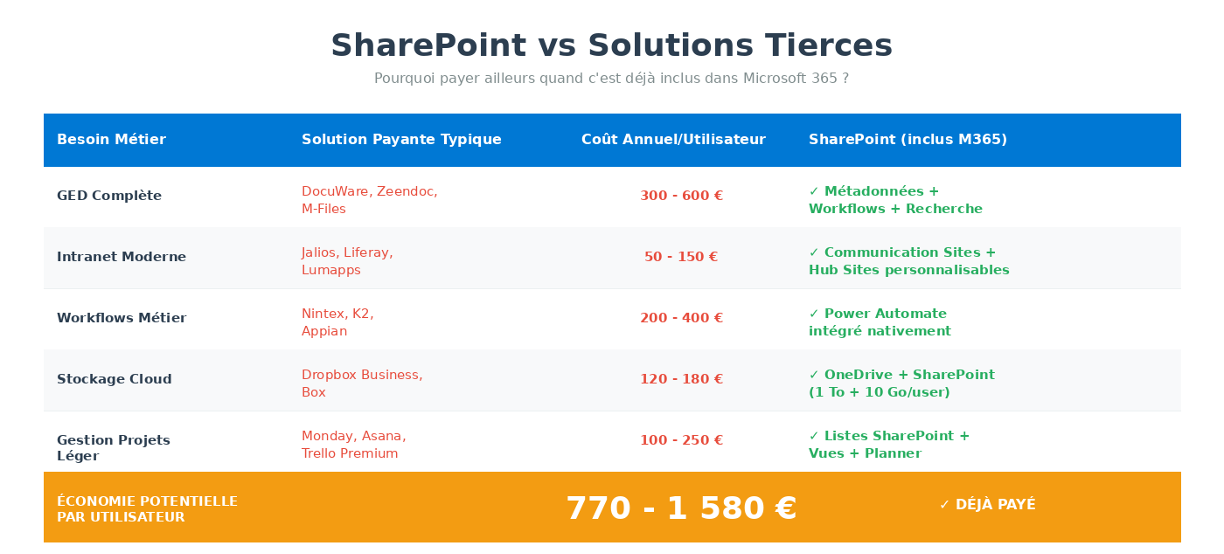
Potential savings: Between €770 and €1,580 per user per year by avoiding redundant solutions.
The Real Limits of SharePoint (Plain English)
Learning curve
Advanced features require training and support. Successful deployment involves :
- Director training
- End-user training
- Accompanying change
Governance Indispensable
Without clear rules, there is a risk of :
- Anarchic proliferation of sites
- Inconsistent permissions
- Duplicate content
- Loss of control
IT Systemes can help you set up SharePoint governance.
High-volume performance
On several million documents, optimizations required :
- Well thought-out library architecture
- Indexing and structured metadata
- Limiting OneDrive synchronization
-
Advanced Customization
For advanced custom development :
- SPFx skills (React, TypeScript) required
- PowerShell scripts for complex automation
- Development time required
Real-life customer use cases
Accounting firm (45 users):
- DocuWare discontinued (€12,000/year)
- Metadata: customer, year, document type, validation status
- Automated approval workflows
- Savings: €12,000/year + time savings estimated at 15h/week
Industrial company (120 users):
- Replacement of a Jalios intranet (€18,000/year)
- Hub Sites by department
- Centralized news
- Integrated Azure AD directory
- Savings: €18,000/year
Conclusion: Exploit What You're Already Paying For
SharePoint isn't just "enhanced file sharing". It's a complete enterprise platform that, properly deployed :
- Replaces several pay tools (EDM, intranet, workflows, storage)
- Integrates seamlessly with the entire Microsoft 365 ecosystem
- Scales with your business from 10 to 10,000 users
- Secure your data with geo-redundant replication and full auditing
- Complies with regulations (RGPD, retention, traceability)
The real question isn't "should you use SharePoint?" - you're already paying for it in your Microsoft 365 subscription.
The real question is, "Why not take full advantage of what you're already paying for?"
IT Systemes : Your SharePoint Partner
As a Microsoft Solutions Partner with 16 years of experience, IT Systemes supports you by:
✓ Modern Work Audit: Analysis of your Microsoft 365 environment and identification of SharePoint opportunities
✓ Migration: From file servers, on-premise SharePoint or third-party solutions
✓ Deployment: Architecture, governance, training
✓ Development: Power Automate workflows, custom sites, integrations
✓ Support: Ongoing support and optimization
Contact us for a free diagnosis of your collaborative infrastructure.






.svg)