.svg)

Why Active Directory security is so important
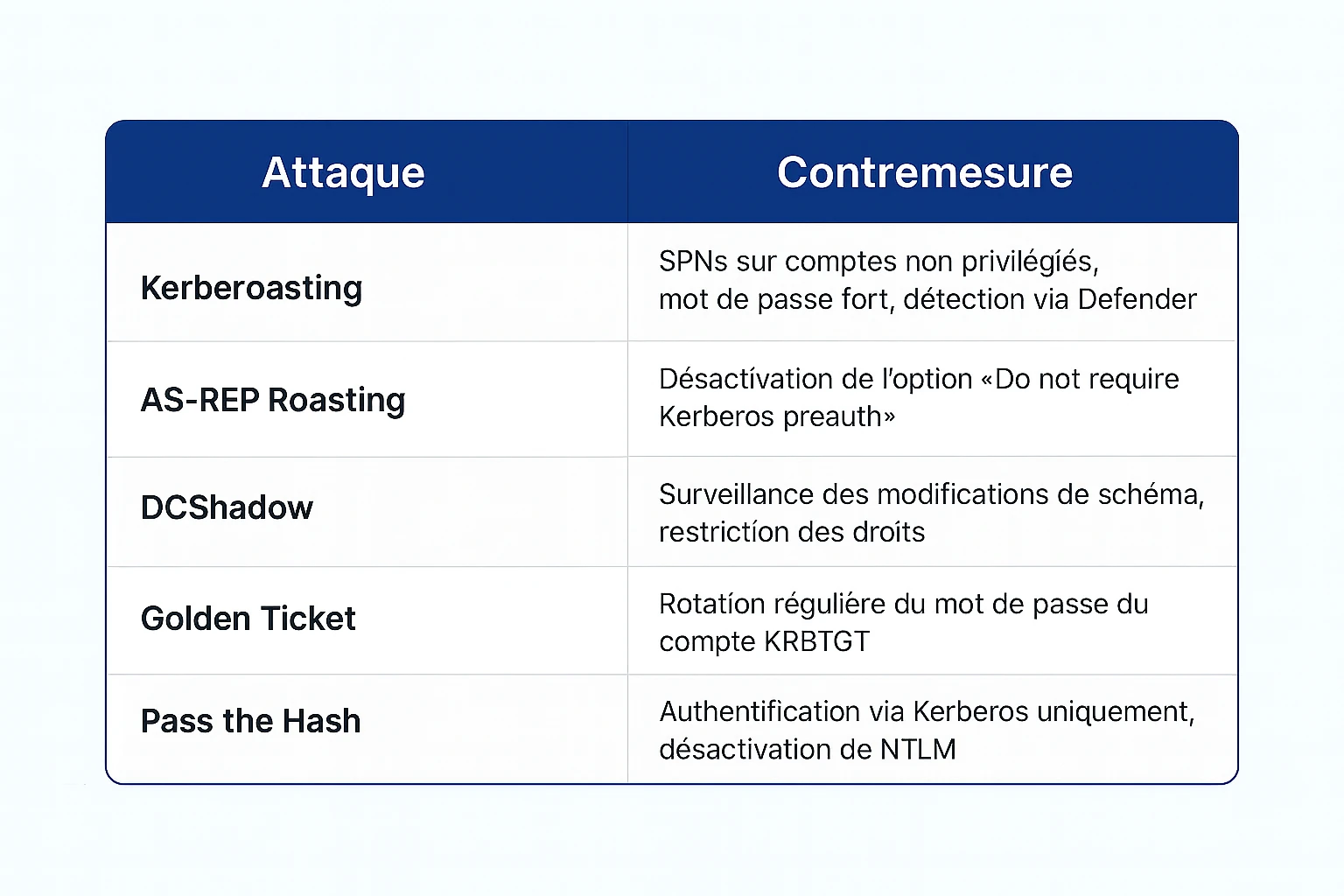
Active Directory is a strategic target for advanced attacks (APT, ransomware, data exfiltration). It is often exploited via :
- Passive recognition (LDAP enumeration, DNS zone transfer)
- Privilege escalation (Kerberoasting, AS-REP Roasting, ACL abuse)
- Persistence (Golden Ticket, Skeleton Key, DCShadow)
- Lateral movements (Pass-the-Hash, Pass-the-Ticket, Remote WMI)
Customer issue: detecting and correcting AD security vulnerabilities
Our customer, an international company in the automotive sector, asked us to audit and reinforce the security of its Active Directory. Several red flags had been identified:
- Unmonitored privileged accounts
- Outdated password policies
- No network segmentation
- Under-exploited event logs
Our approach to securing Active Directory
We have put in place a comprehensive four-step approach to strengthen security, visibility and governance of the DBA.
1. Audit Active Directory environment
- Mapping objects, groups and trust relationships
- Using BloodHound to map privilege relationships
- Vulnerability and dependency analysis :
- PingCastle: AD security scoring, configuration vulnerability detection
- LDAPDomainDump: extract AD objects for offline analysis
- ADRecon: generating technical reports on AD objects
- Analysis of ACLs on sensitive objects (OUs, GPOs, Admin accounts)
- Verification of inter-domain and inter-forest trusts
- Identification of accounts with exposed SPNs (Kerberoasting)
- Identifying high-risk accounts
- Analysis of GPOs and security configurations
2. Reinforcement of access controls and privileges
- Applying the principle of least privilege
- Definition of a Tiering Model adapted to environment and applications :
- Tier 0: DCs, Domain Admin accounts, PKI
- Tier 1: application servers
- Tier 2: user workstations
- Securing administrator accounts (MFA, bastion, password rotation)
- Separate administration and user accounts
- Cleaning up obsolete or inactive accounts
- Setting up a compliant, outsourced backup system
- PAW (Privileged Access Workstations) deployment
- Restricting administrative rights via AdminSDHolder and Protected Users
3. Continuous monitoring and real-time alerting
- Integration with a SIEM solution to detect abnormal behavior and set up the SOC
- Implementing LAPS and BitLocker
- Create alerts on critical changes :
- Add to Domain Admins
- Modifying ACLs on DCs
- Creating accounts with extended rights
- Exploitation of event logs (Event ID 4624, 4672, 4720, etc.)
- Review of GPOs applied to DCs and privileged accounts
- Disabling unsigned scripts
- Application of Group Policy Hardening :
- SMBv1 deactivation
- PowerShell restriction
- NTLM v1 removal
4. Training and documentation
- Raising awareness of Active Directory security among IT teams
- Drafting of secure account and access management procedures
Results after AD safety upgrade
- 80% reduction in unjustified privileged accounts
- Significant improvement in overall safety posture
- Compliance with ISO 27001 and NIS2 standards
- Greater resilience to ransomware attacks
- Alignment with MITRE ATT&CK, CIS Benchmarks and ANSSI recommendations
- Enhanced Microsoft Secure Score (Entra ID)
- Proactive detection of suspicious behavior via SIEM
Protection against known attacks: countermeasures table
Conclusion: strengthening Active Directory security for the long term
Securing Active Directory is not an option, it's a necessity. Thanks to our expertise, our customer now has a directory that is robust, monitored and compliant with market best practices.
For a comprehensive guide to securing Active Directory (the 10 priority hardening measures, the 5 most exploited vulnerabilities, the link with NIS2), see our detailed article: Active Directory security: the guide to protecting the core of your IT system.
.webp)