.svg)
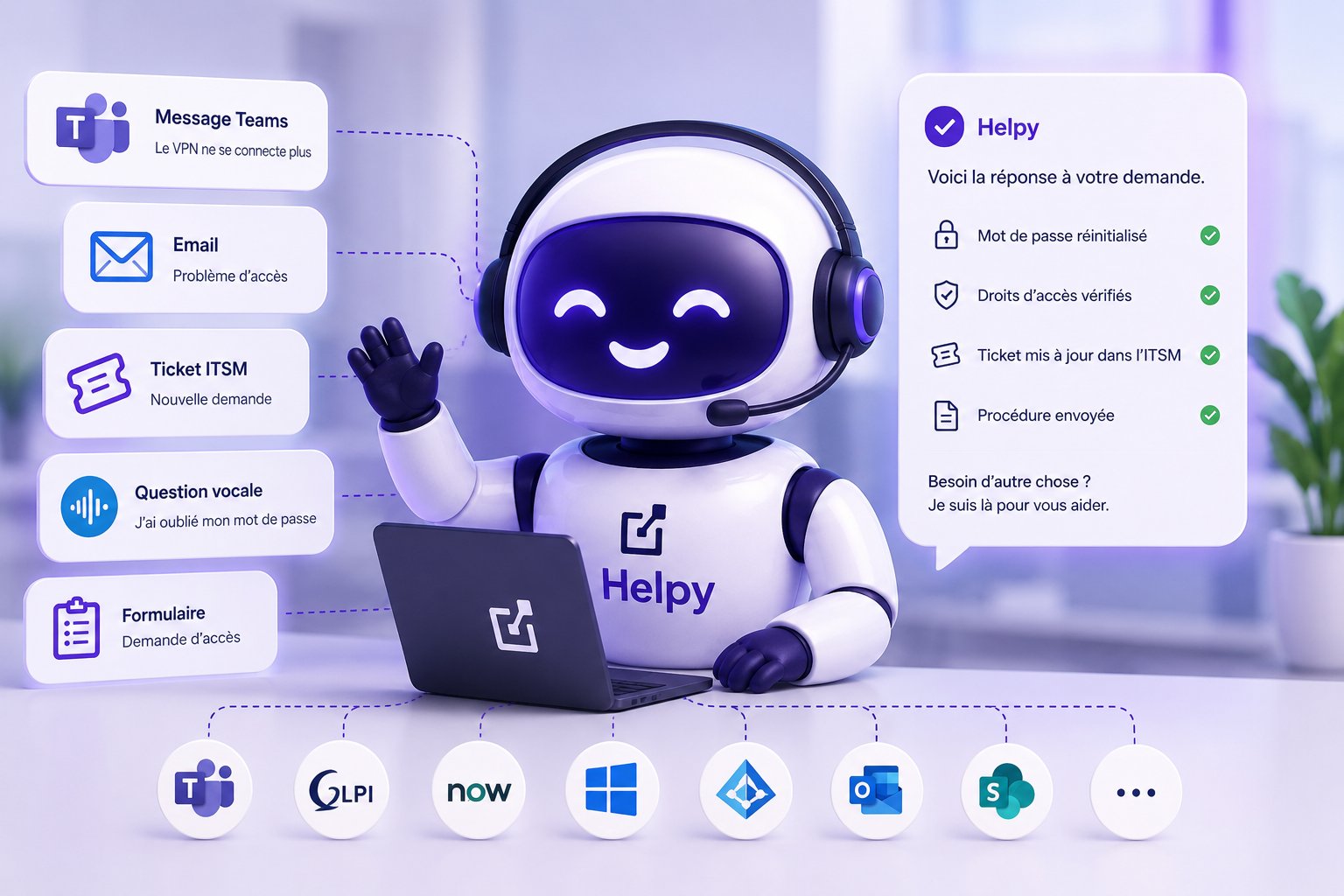
IT Systèmes has been providing IT outsourcing services for 16 years. Every day, our technicians handle support tickets for our clients. And every day, we saw the same issues come up: forgotten passwords, slow VPN connections, Outlook failing to sync, and access rights that needed to be restored.
In 2025, we decided to stop. Not to stop responding altogether, but to stop handling ourselves what a well-designed machine can process in a matter of seconds. We built Helpy. We tested it on our own support tickets for months before offering it to our customers.
Here's what happened. The numbers, the mistakes, the lessons learned.
1. What we saw, month after month, in our own IT outsourcing operations
Before Helpy, our IT outsourcing team handled several thousand tickets per month for all of our clients. The breakdown was fairly typical for this type of business:
- 60% to 70% of Level 1 tickets: repetitive questions, quick resolution, little value added for the technician
- 20–25% Level 2: incidents requiring diagnosis
- 10–15% Level 3: critical issues, specialized expertise, project support
The problem wasn't the volume. The problem was that our technicians—whom we hire for their expertise—spent most of their day on repetitive tasks.
We knew something had to be done. The question was: what, and how.
2. Why we decided to build our own agent
We had several options on the table. We decided to build an AI agent specifically designed for our industry. There were several reasons for this decision, not just one.
Our knowledge base spanned 16 years
Having provided IT outsourcing services since 2010, we’ve built up a unique body of knowledge: tens of thousands of resolved tickets, well-established procedures, and ITSM connectors designed for a wide variety of scenarios. We didn’t want to start from scratch. We wanted our agent to build on this foundation.
We manage multiple ITSM systems simultaneously, not just one
Depending on the client, we work with GLPI, ServiceNow, Freshdesk, Jira, and sometimes in-house solutions. We needed an agent that could communicate with all of these natively, not through a generic connector that only works 80% of the time.
Some of our clients have sovereignty requirements
Healthcare, public sector, regulated industries: for some of our clients, hosting in France and not using data to train third-party models are non-negotiable. We wanted to be able to address these requirements without compromise.
We wanted to retain ownership of the stack
Code, prompts, knowledge base, permissions: we wanted everything to stay in-house. And we wanted everything to remain with our clients when we deploy to their environments. No hidden lock-in, no reliance on third parties for our core business.
Please note
Building an AI agent isn’t always the right solution. For many small and medium-sized businesses with a simple help desk and Microsoft 365 already in place, a standard solution works just fine. That’s what we recommend when the situation calls for it (we discuss this in our help desk use case with Microsoft Copilot Studio).
In our case, the situation called for a custom-built solution. Helpy was born out of this analysis.
3. What We've Built: Helpy in Three Building Blocks
Helpy's architecture is built on three components that work together: understanding, reasoning, and acting. This is the foundation of any serious domain-specific AI agent.

Understanding: RAG on our history curriculum
The first building block is the ability to understand user needs and find the right information. We’ve indexed our knowledge base in a vector database: internal procedures, historical resolved tickets, client-specific documentation, and user FAQs.
When a user asks a question in Teams, Helpy doesn't just search for keywords. It performs a semantic search of the database to identify similar contexts that have already been addressed.
Reasoning: a fine-tuned LLM, selected based on the context
The second component combines the user's request, the context retrieved by the first component, and the client-specific business rules. The model used varies depending on the context's requirements: a public model for most cases, a dedicated model for sensitive data, and an on-premises model for the most critical contexts.
Helpy's decision-making is governed by explicit business rules. It never decides on its own to take a sensitive action. It makes a recommendation, and a human validates it when necessary.
Action: Orchestration via API, MCP, and workflows
The third module takes action. Helpy doesn’t just respond with a text message. It opens a ticket in the ITSM system, verifies access rights in Active Directory, triggers a password reset workflow with identity verification, or escalates the issue to the appropriate technician with all the relevant context already gathered.
This third component is what sets a true business agent apart from a simple chatbot. It is also the most technically demanding, because it requires seamlessly integrating tools that were not designed to communicate with one another.
4. Pitfalls in AI agent projects (and how to avoid them)
Beyond our own experience, there is a fairly consistent list of mistakes that crop up in the vast majority of AI agent projects, whether they’re carried out in-house or with a vendor. We’ve made some of them ourselves with Helpy. Others we’ve seen with our clients who had already tried their hand at it before us. All of them are worth listing here, because this is what separates a project that delivers in 12 weeks from one that gets bogged down for 18 months.
Trying to cover everything at once
This is the most common mistake. We list 50 use cases, expect the agent to handle them all, and end up with mediocre quality across the board and zero user trust. The rule that works: start with the 10–15 cases that account for the majority of the volume, achieve 95% quality on those, and then expand. It’s better to be excellent at a few things than average at many.
Underestimating the quality of the knowledge base
AI doesn’t create quality. It reveals the quality—or lack thereof—in your data. A heterogeneous, inconsistent, or outdated dataset produces incorrect results, and people then blame the model. The model is rarely to blame. The rule of thumb: audit and structure the dataset before writing a single line of code. Three weeks of cleanup upfront are worth six months of fixes down the line.
Skip the "human-in-the-loop" step for sensitive actions
An agent who simply responds poses no risk. An agent who takes action (resetting passwords, changing permissions, unblocking access, sending quotes, updating the CRM) can make mistakes with serious consequences. The rule that works: for any sensitive action, the agent makes a proposal, and a human validates it with a single click. The time savings are still significant, and the responsibility remains with the human.
Launching a POC without a production plan
This is the mistake that kills the most AI projects. You launch a brilliant proof of concept in six weeks, everyone’s happy, and then no one knows how to get it into production. Six months later, the POC is dead. The rule that works: define the conditions for deployment right from the scoping phase—who oversees it, who maintains it, who pays for it, and how it integrates with the actual IT system. No POC without a production plan.
Confusing the three levels of AI projects
Not all AI projects are created equal. There are off-the-shelf tools (Type 1, such as Copilot M365), tools tailored to specific business functions (Type 2, such as Helpy), and long-term, transformative projects (Type 3, such as a data system overhaul). Choosing a Type 3 solution when a Type 2 would suffice costs hundreds of thousands of euros and wastes months of time. Choosing a Type 1 solution when a Type 2 is needed yields disappointing results that undermine AI’s credibility internally. The rule that works: start the scoping process by asking , “What is the least ambitious solution that solves your problem?”
Forgetting to manage change with the teams
An AI agent that’s suddenly introduced without explaining to teams how it will affect them is bound to meet resistance. Technicians, salespeople, and accountants aren’t against AI in principle. They’re against the idea of being replaced without having been consulted. The rule that works: get teams on board right from the scoping phase, involve them in building the knowledge base (it’s their expertise we’re capturing), and highlight the shift toward higher-value tasks through training, career advancement, and sometimes a pay raise.
Measuring too late
During the first few months, you can “sense” that the system is starting to work, but you’re unable to prove it with numbers. When the executive committee asks for a report, you spend a week reconstructing the data. The rule that works: define the dashboard and the five key metrics (self-resolution rate, user satisfaction, average resolution time, escalation rate, and quality measured by survey) during the scoping phase. Not afterward. Without metrics from day one, there’s no way to defend the initiative in front of the executive committee, and no continuous improvement.
To think that AI is magic, with no humans behind it
This is the opposite of "human-in-the-loop," and it's just as common. You deploy an agent and turn off monitoring, assuming the model will figure it out on its own. After a few weeks, quality starts to decline, unforeseen issues arise, and no one notices. The rule that works: an AI agent in production needs a human supervisor who monitors the logs, handles exceptions, and enriches the database. This isn’t an option—it’s a job.
Launching the project with a top-down approach without listening to those on the ground
It’s a classic scenario: an AI project conceived by the executive committee that’s out of touch with the teams’ actual pain points. We automate processes that didn’t need automating, miss the real issues, and the teams end up watching the project from the sidelines. The rule that works: start with the pain points the teams have identified, not with a PowerPoint vision. The best use-case ideas almost always come from the front lines.
Underestimating IT integration
This is the most costly technical pitfall. We regularly see AI agents that work very well on their own, but take six months to integrate with CRM, ITSM, HR, or accounting software because integration was an afterthought. The rule that works: an AI agent is only valuable when connected to the IT system. Integration must be planned from the scoping phase, designed by senior developers, and scaled up. No DIY solutions.
Of these ten pitfalls, we’ve managed to avoid some because we’ve been in the business for 16 years. Others we’ve learned to avoid the hard way while building Helpy in-house. It’s precisely this hard-won experience that we now apply to our clients: we start by identifying which of these pitfalls are most likely to arise in their specific context, and we address them right from the scoping phase.
5. What came of it
We started with ourselves. Helpy was tested on our own tickets before being offered to our customers, and this phase served as a trial run. The figures we’re releasing today pertain to our customer base and not to our internal help desk: they are detailed—along with their methodology and limitations—in our Helpy Barometer.
The published figures
60% of Level 1 tickets are closed without human intervention
Average resolution time: 3 minutes
55 clients under full-service management contracts, all of whom have been migrated to Helpy since June 1, 2026
Available 24/7, including nights and weekends
Scope: Customers with full-service management contracts. Period: June, July, and August 2026. Counting rule: Any ticket taken over by a technician—even if it was partially handled by the agent—is excluded from the rate.
How this has changed things for the team
Our technicians have been reassigned to higher-value N2/N3 tasks. The remaining N1 workload handled by humans has become challenging (the cases that Helpy escalates are, by design, complex or sensitive ones—not forgotten passwords).
Turnover in support roles has decreased. So has employee satisfaction.
What has changed for users
From the users' perspective (our own internal staff, and gradually our clients' staff as well), the most noticeable change is the response time. A question sent via Outlook at 10 p.m. gets a reply by 10 p.m.
User satisfaction has seen a noticeable increase, as measured by post-interaction surveys and changes in the support NPS.
6. Le tarif Helpy : 15 €HT par utilisateur et par mois, tout inclus
On a fait l'effort de calculer le coût tout compris sur 24 mois, en incluant notre temps interne. C'est ce qui nous a permis de fixer le prix de Helpy à 15 €HT par utilisateur et par mois pour nos clients, à partir de 5 utilisateurs et sans engagement de durée. Pas de marge cachée, pas de surprise au renouvellement.
Ce que comprend le tarif Helpy à 15 €HT par utilisateur et par mois
- The Helpy agent itself, configured for your environment
- Level 0 and 1 Support, AI and Human: Agents available 24 hours a day, 7 days a week; the team is available during business hours
- Hosting (in France or on-premises, depending on your requirements)
- Integration with your ITSM and business tools
- The multichannel portal for your users
- The ongoing expansion of the knowledge base
- Monitoring Dashboards
- Supervision and monitoring by our team
- Changes to prompts and business rules
Not included: your Microsoft 365 licenses (if not already in place) and the initial setup fee (4 to 8 weeks, depending on the scope of your project).
7. What works for you (and what doesn't)
Our feedback is only useful if you can put it to use. Here’s an honest look at what you can say in response, and what’s specific to IT Systèmes.

8. What we're building after Helpy
Helpy is just the first bot we've built for ourselves. More will follow.
The idea has become an ongoing process: before we propose an AI agent to our clients, we test it on ourselves. We break it, we improve it, we put it through its paces. When we meet with a client, we don’t just pitch an idea. We share an experience.
In the coming weeks, we’ll be sharing our experiences with these other agents here. Each post will describe a real-life case, the challenges we faced, and the results we achieved. No sugarcoating.
9. Helpy is for you if…
Helpy isn't a one-size-fits-all solution. We'd rather say that up front. Here are the situations where Helpy is the right choice, and those where a simpler solution will suffice.

If you're in the right-hand column, that's not a problem. Our helpdesk use case with Microsoft Copilot Studio is probably a better fit for your situation. We're guiding you toward the right option, not the most expensive one.
10. The next step, if you want to take it further
If, after reading this, you're wondering whether Helpy can do for you what it did for us, here's what we offer.
A 30-minute video call. We’ll review your ten most frequent N1 tickets together, tell you which ones can be automated right away, and provide a cost estimate for the project. No lengthy quotes, no product pitches. A free, no-obligation recommendation that’s useful even if you don’t end up working with us.
Or to learn more about the solution: Helpy, our AI-powered helpdesk solution ->
About this article
Article written by Samir Amara, President of IT Systèmes, based on direct feedback from our IT outsourcing team regarding the internal deployment of Helpy.
To contact me directly: s.amara@it-systemes.fr
IT Systèmes, ESN française fondée en 2010, 44 collaborateurs, quatre implantations : Paris (Malakoff), Lyon, Annecy et Bordeaux. Certifié ISO 27001 pour nos activités de conseil, projets, sécurité et infogérance (AFNOR Certification), Microsoft Solutions Partner, conformité AI Act, agrément CIR







.svg)