.svg)
RPA (Robotic Process Automation) automates the repetitive tasks that humans perform on computers. It has become mature, accessible, and cost-effective—provided you know where to use it and where not to.
In this guide, we give you an honest look at RPA in 2026: what it really is (without the vendor jargon), how it works, what it costs, what it delivers, and how to avoid mistakes during implementation.
1. What exactly is RPA?
RPA = Robotic Process Automation. The word “robot” can be misleading: this does not refer to physical robots. An “RPA robot” is software that mimics what a human does on a computer (clicking, copying, typing, reading emails, switching between applications).
To put it simply: it’s as if you hired an infinitely patient employee who repeats the exact same actions 24 hours a day, never makes a mistake, and never needs a coffee break.
The true technical definition
An RPA robot executes predefined rules, in a predefined order, on existing software interfaces. It doesn’t make decisions. It doesn’t think. It doesn’t adapt on its own to new situations. It does exactly what it has been programmed to do—no more, no less.
That is both its strength and its limitation.
Why is this different from traditional automation?
When a developer connects two software applications via an API (technical interface), they’re performing standard integration. But in the real world of business, half of all business software either lacks an API or has APIs that are too limited to meet the need. Outdated accounting software, proprietary ERP systems, and custom business applications developed 15 years ago—they don’t open up easily.
RPA solves this problem by interacting with the user interface just as a human would: it “sees” the screen, clicks buttons, fills in fields, and reads the results. No API is required, and no changes to the target software are needed.
That's what makes it incredibly useful for automating legacy systems that no one wants (or is able) to overhaul.
What RPA Is Not
To avoid disappointment, let’s set the stage:
- RPA is not AI. An RPA robot does not understand natural language, does not make predictions, and does not adapt to new scenarios. (Modern solutions add an AI layer to this; we’ll discuss that further below.)
- RPA isn't magic. If the human process is poorly designed, automating it will only make the problem happen faster.
- RPA isn't free. A vendor license ranges from €9 per month for no-code tools to several hundred dollars per month per robot for enterprise RPA platforms, with higher tiers available strictly on a quote basis. On top of that, there are costs for design, deployment, and maintenance.
- RPA isn't set in stone. If the target software's interface changes (update, UX redesign), the robot may stop working and require
- to achieve a recovery.
2. How does it actually work?
Let’s take a real-world example: entering supplier invoices into accounting software.
Without RPA (A Day in the Life of an Accounting Assistant)
- Open Outlook and identify emails containing invoices
- Download the PDF attachments
- Open each PDF, read the invoice number, amount, supplier, and date
- Open the accounting software
- Create a new entry
- Enter each piece of information manually
- Save
- Save the PDF to the correct folder
- Reply to the email to confirm receipt
- Do it 50 times a day
According to APQC benchmarks, the average cost of manually processing an invoice ranges from $12 to $30 (compared to $3 to $5 for automated processing). For 1,000 invoices per month, the annual difference is significant.
With RPA
- The bot checks the dedicated email inbox every 5 minutes
- It downloads incoming PDFs
- It automatically extracts data (number, amount, supplier, date)—often using AI these days
- He opens the accounting software
- He grasps the writing
- He saves the PDF to the correct network folder
- It automatically replies to the email with a confirmation of receipt
The human operator now handles only exceptions (illegible invoices, new suppliers, suspicious amounts). Industry benchmarks estimate that time saved on invoice entry ranges from 50% to 70%, with faster processing times and fewer errors (the error rate dropping from an average of 2% to 0.3%).
The trigger: what sets the robot in motion?
Several options available depending on your needs:
- On an event: a new email arrives, a file is uploaded to a network folder, a row is added to a Google Sheet
- At a set time: every morning at 7 a.m., every Friday at 5 p.m.
- On demand: A user clicks a button in Microsoft Teams or Slack
- Running continuously: the bot runs 24/7 on a dedicated server
It is this flexibility that makes RPA so powerful.
RPA & Automation — IT Systems
How much could you earn
by automating your processes?
Let's analyze your situation together in 30 minutes: identify processes with high ROI, estimate potential gains, and choose the right tool.
3. RPA vs. AI Agents: Understanding the Difference
This is probably the most common misconception in 2026. RPA and AI agents are often marketed as the same thing. They are not.
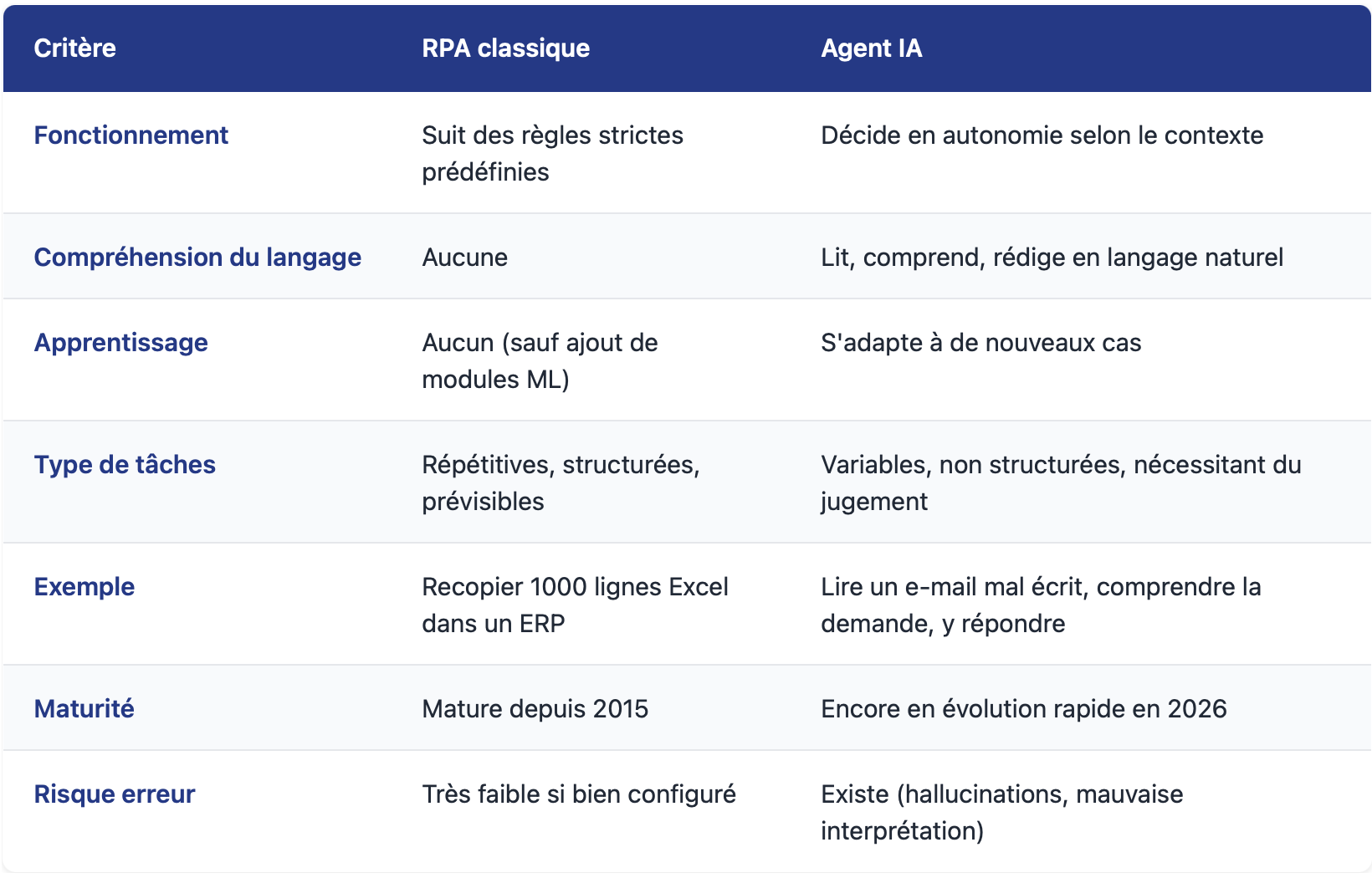
When should you choose RPA?
Choose RPA when:
- The process is consistent (the steps don't change every month)
- The data is structured (forms, tables, standard formats)
- The volume is high (at least several hundred cases per month)
- Errors are not acceptable (accounting, compliance)
When should you choose an AI agent?
Choose an AI agent when:
- The data is unstructured (plain-text emails, various PDF documents, conversations)
- The process requires judgment (qualifying a lead, responding to a customer complaint)
- Cases vary widely and are unpredictable
- You need to interact with people (chat, writing)
The real answer in 2026: it's often both
Modern solutions combine RPA and AI within a single workflow. For example: an RPA robot retrieves invoices (a structured task), AI extracts data from the PDF (document understanding), and then the RPA robot takes over to enter the data into the accounting software. This is sometimes referred to as IPA—Intelligent Process Automation.
4. 5 RPA use cases that really work in business
Rather than listing all possible scenarios, here are five use cases that have proven effective for French small and medium-sized businesses and mid-market companies in 2025–2026, along with the ranges of returns observed in the market.
Case 1 — Accounting: Automated Entry of Vendor Invoices
The problem: An accounting assistant spends several hours a day manually entering invoices into the software.
The RPA solution: a robot reads incoming emails, extracts data from invoices (with or without AI, depending on the quality of the PDFs), enters the data into the software, files the invoice, and responds to the supplier.
Industry benchmarks: According to APQC and several Forrester studies, automating invoice entry saves 50 to 70% of the time, reduces processing costs from $12–$30 to $3–$5 per invoice, and lowers the error rate from 2% to 0.3%.
Commonly used tools: Power Automate (for the Microsoft ecosystem), UiPath (for high volumes), and self-hosted n8n (for advanced tech).
Case 2 — Human Resources: Onboarding New Employees
The problem: every time a new employee joins the company, the HR team manually creates a Microsoft 365 account, sets up access to internal tools, sends a welcome email, schedules training, and notifies IT to order equipment. This process takes several hours spread across HR, IT, and managers.
The RPA solution: a workflow triggered by the hiring form. Automatic creation of a Microsoft 365 account, addition to relevant Teams groups, sending of login credentials, scheduling of training sessions, and creation of an IT ticket for hardware.
The benefits observed: beyond saving time, the goal is zero oversights, zero delays, and zero new employees waiting three days for their email access. This is a classic example of how RPA improves both the employee experience and operational efficiency.
Case 3 — Customer Service: Routing and Screening of Incoming Requests
The problem: dozens to hundreds of customer emails arrive in a shared inbox every day. Someone reads them, sorts them, and assigns them to the right department. Average processing time: several hours.
The combined RPA + AI solution: a robot reads incoming emails, AI classifies them (complaint, sales inquiry, technical question, administrative question), and the robot routes them to the appropriate team or ticketing system.
The main benefit: near-instant qualification versus several hours, and much better visibility into volumes by category. According to Forrester benchmarks, this type of automation with an AI layer achieves productivity gains of at least 25% compared to manual processing.
Case 4 — Manufacturing: Reconciliation of purchase orders, delivery notes, and invoices
The problem: In an industrial SME, the purchasing department manually verifies that the purchase order, the received delivery note, and the supplier’s invoice match. They handle several hundred transactions per month, with discrepancies in 15 to 25 percent of cases.
The RPA solution: a robot extracts data from the three documents, cross-checks it, flags discrepancies (amount, quantity, reference), automatically validates exact matches, and alerts a human only in the case of exceptions.
The benefit: According to feedback from specialized firms, the three-step automated reconciliation process reduces matching time by 70 to 80% (from 30 minutes to 5 minutes per file on average) and prevents overbilling, which typically accounts for 1 to 3% of unchecked supplier expenses.
Case 5 — Law firms and accounting firms: extracting information from documents
The problem: A law firm receives dozens of contracts to review every week. Manually identifying sensitive clauses, key dates, and stakeholders takes several hours per contract.
The RPA + AI solution: a workflow reads incoming contracts, AI extracts key elements (parties, term, termination clauses, penalties, jurisdictions), and RPA automatically populates the customer record in the business software.
The benefit: In recent documented implementations, time savings of over 50% have been observed in document analysis, along with a consistency in analysis that no human team can guarantee from one case to the next.
What these five cases have in common
These examples all work because they meet the same criteria:
- Sufficient volume (several dozen to several hundred cases per month)
- Stable process (the steps rarely change)
- High human cost (one person dedicated to the task for several hours a day)
- Costly errors (missed entries = accounting issues, late payments, etc.)
If your process doesn't meet at least 3 of these 4 criteria, don't automate it. That's the first rule we give our clients.
Save Time Factory — IT Systems
Have a process in mind?
We can automate it in 3 hours.
Save Time Factory takes care of everything: mapping, development, and maintenance. No coding required, and no need for an in-house technical team.
5. How much does it cost, and what ROI can you expect?
Let’s be specific about the numbers, relying on available market benchmarks rather than vague promises.
Understanding the two pricing models in the market
Before comparing prices, it is important to understand that two pricing models coexist in the RPA market in 2026. Confusing the two leads to misleading comparisons.
Model 1 — Project-based pricing: You pay for a platform license (monthly or annually) + scoping and development services (one-time, per project) + ongoing maintenance (annually). This is the traditional RPA model, which remains the dominant approach for large-scale deployments. It is suitable for companies with strategic automation needs and a portfolio of several upcoming projects.
Model 2 — Per-flow pricing: You pay a subscription fee per automation (per flow), with setup services billed by the hour or included, depending on the provider. No platform license is required. This is an alternative model, particularly suited to microbusinesses, small and medium-sized enterprises, professional firms, and organizations that have occasional needs and no in-house technical team.
The orders of magnitude differ drastically between the two models. We will examine them separately
Model 1 — Project-based pricing (traditional RPA)
A typical RPA project involves three distinct cost categories.
A. Licenses (recurring monthly cost)
RPA and automation tools come in a range of price points, from self-service solutions costing €10–50 per month (Make, Zapier, n8n) to enterprise platforms costing tens of thousands of euros per year (UiPath Enterprise, Workato, MuleSoft). In between, there are standalone iPaaS solutions like FlexFlow (starting at €990/month) and the Microsoft Power Automate ecosystem ($15 to $215 per user or bot per month, depending on features).
For a detailed comparison of the leading tools on the market, including their pricing, features, benefits, and use cases, check out our two dedicated resources:
- Comparison of 14 AI Automation Tools in 2026 : Zapier, Make, n8n, Save Time Factory, Power Automate, UiPath, and seven AI agents analyzed one by one.
- Comparison of the Best iPaaS Platforms in 2026 : for enterprise integration needs (Workato, MuleSoft, FlexFlow, Boomi, etc.).
In this article, we focus on cost items beyond licensing —namely, design, deployment, and maintenance—which often account for 70 to 75 percent of the actual total budget for an RPA project.
B. Design and deployment (one-time cost)
This is where many companies are caught off guard: the license isn't the whole story. In addition to the tool subscription, you need to budget for scoping, development, and deployment services.
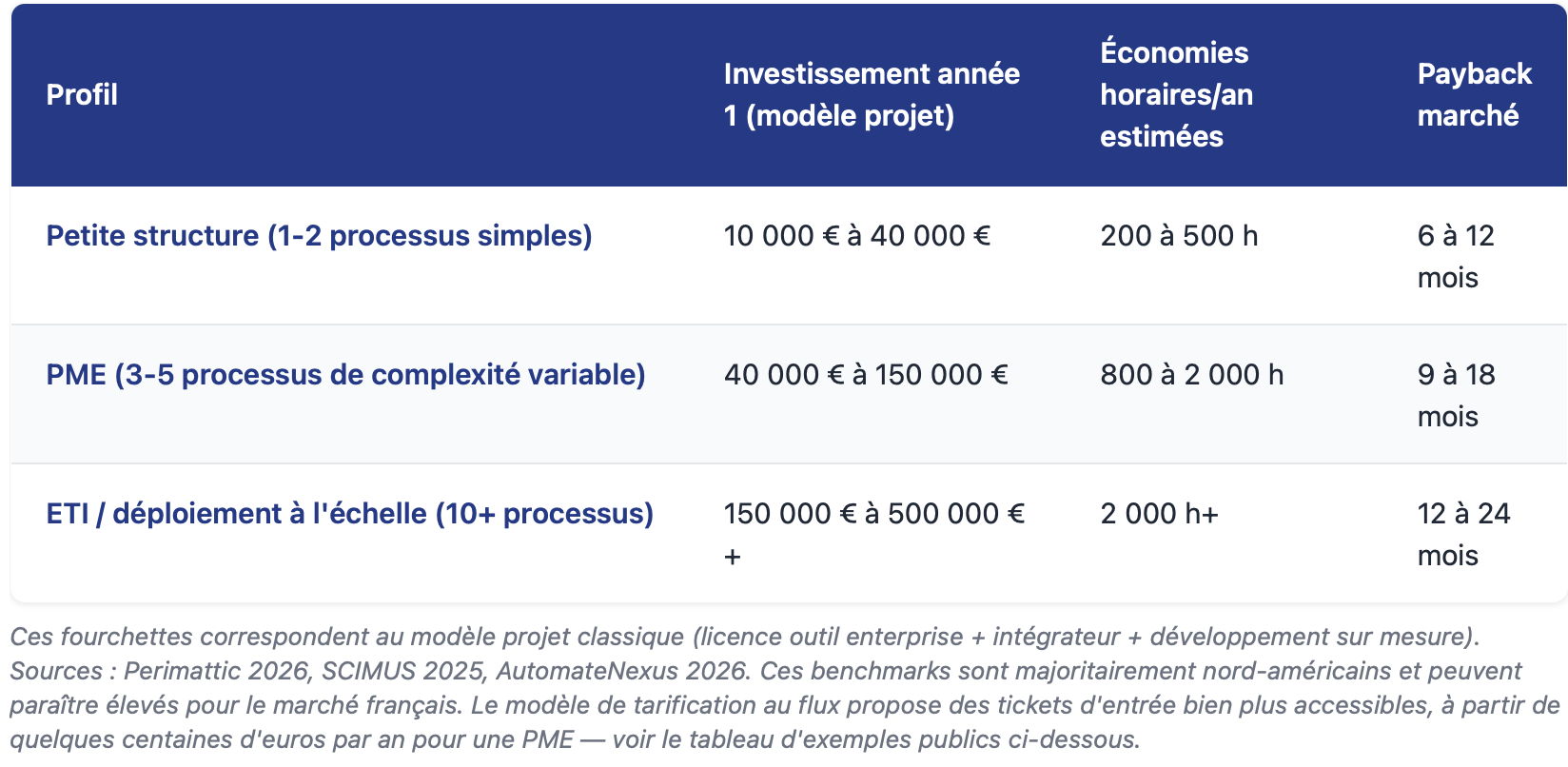
According to recent public benchmarks (sources: SCIMUS 2025, Perimattic 2026, EasyData 2026, ByteScout, Forrester), which aggregate RPA projects primarily from North America and Europe, the observed ranges are as follows:
- Simple automation (1 tool → 1 tool, clear trigger, few exceptions to handle): typically between €5,000 and €25,000 per process.
- Moderate automation (3–4 connected tools, error handling, monitoring dashboard, a few business rules): typically between €20,000 and €75,000 per process.
- Complex automation (RPA on legacy software without APIs, AI-powered document extraction, multi-service workflows, critical processes): starting at €50,000 and potentially exceeding €150,000 per process, or even much more for large-scale deployments in large organizations.
⚠️ Important caveats regarding these figures: these ranges are based on the project model ( integrator + scoping + custom development), primarily derived from North American sources. They may vary depending on the geographic region, the level of customization, the integrator’s experience, and the quality of existing documentation. Under a flow-based pricing model (see below), the orders of magnitude are radically different.
C. Maintenance (a recurring cost that is often overlooked)
That’s the catch with RPA: it doesn’t run on its own. Target software evolves (Microsoft 365 updates, ERP overhauls, API changes), and robots can break.
According to public benchmarks (SCIMUS, EasyData), you should budget for 15% to 20% of the initial cost per year for ongoing maintenance if you want your automation solutions to remain effective over time. This expense is often omitted from initial estimates, and it is one of the main causes of budget overruns in RPA projects in year 2 and beyond.
Key figures to keep in mind for a project using the traditional model
Model 2 — Pay-as-you-go pricing
The per-flow pricing model works on a different principle: there’s no platform license to purchase and no large setup budget. You pay a monthly subscription fee for each flow (each automation) you use. Setup is billed by the hour (or included in certain packages, depending on the provider).
Save Time Factory, published by IT Systèmes, is a prime example of this model. According to their public pricing page:
- Streaming subscription: €19.90/month for a stream from Source A to Source B
- Additional feed: €4.90/month per feed added
- Setup: €170 per hour (excluding tax), with an average duration of 3 hours per process; the rate decreases to €100 per hour based on volume, as tracked via timesheets
- No obligation
Examples of public rates (excerpts from the Save Time Factory page)
Here are some examples taken directly from the pricing catalog published on the official Save Time Factory website, which give an idea of the recurring costs:
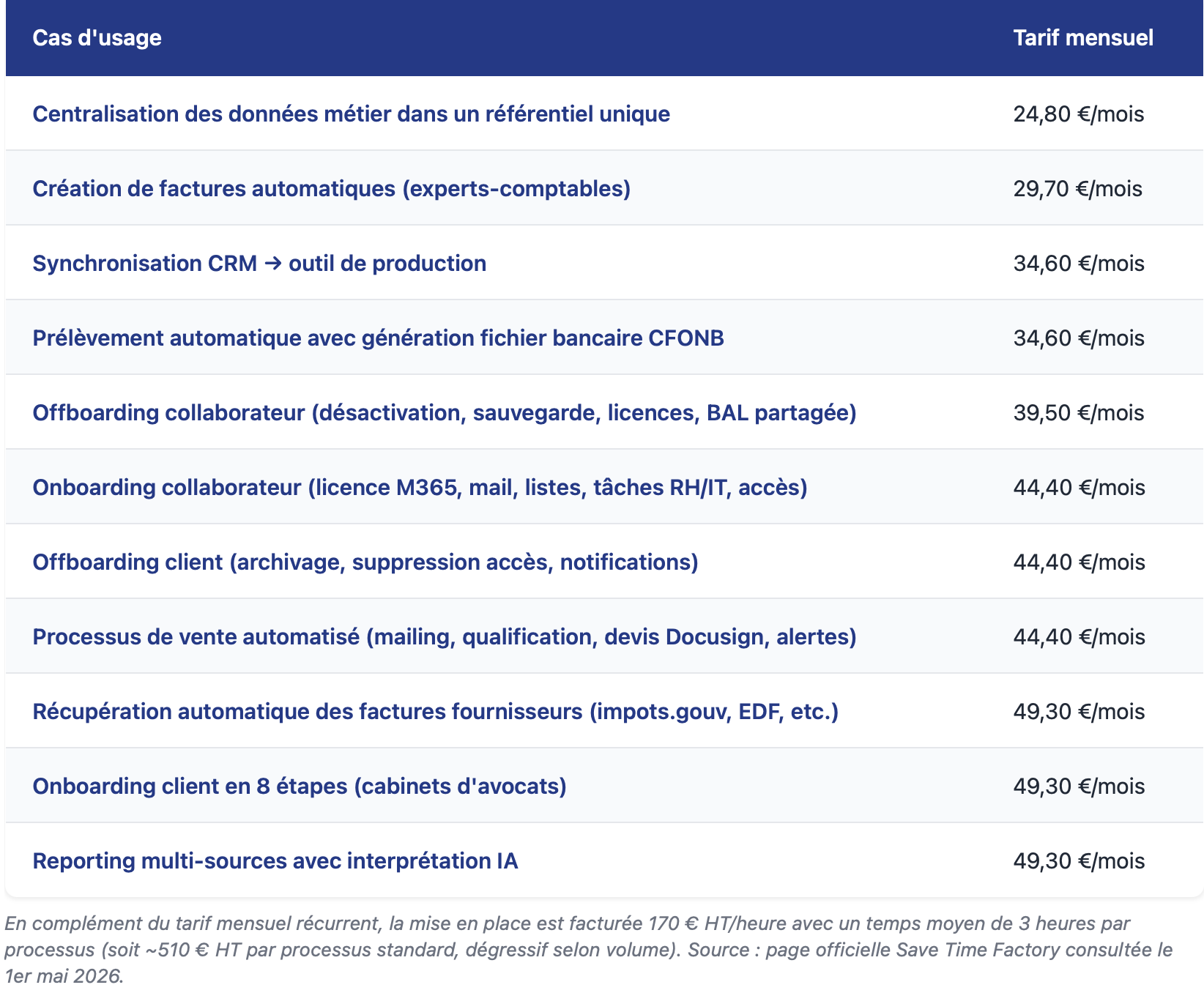
What does a cash flow budget look like?
Based on the public examples above, we can provide some reference ranges—bearing in mind that each case depends on the exact number of flows and their complexity:
- Small business / firm / association with 1 payment stream: ~€25–50 per month (recurring) + €510 one-time setup fee
- Small business with 2–3 payment streams: ~€50–150/month (recurring) + €1,020–1,530 one-time setup fee
For an accurate estimate tailored to your specific situation, requesting a quote will provide you with a firm price.
How do I choose between the two models?

The general rule is this: the more automations you need to deploy and the larger your in-house technical team, the more cost-effective the project-based model becomes. Conversely, the more one-off your needs are and the fewer in-house technical resources you have, the more suitable the on-demand model is.
Many companies start with a flow-based model for 2–3 use cases, then switch to a project-based model once their automation portfolio exceeds 5–10 processes.
ROI: What the Market Says
Public benchmarks generally agree on these figures, which are primarily based on traditional RPA projects using a project-based model:
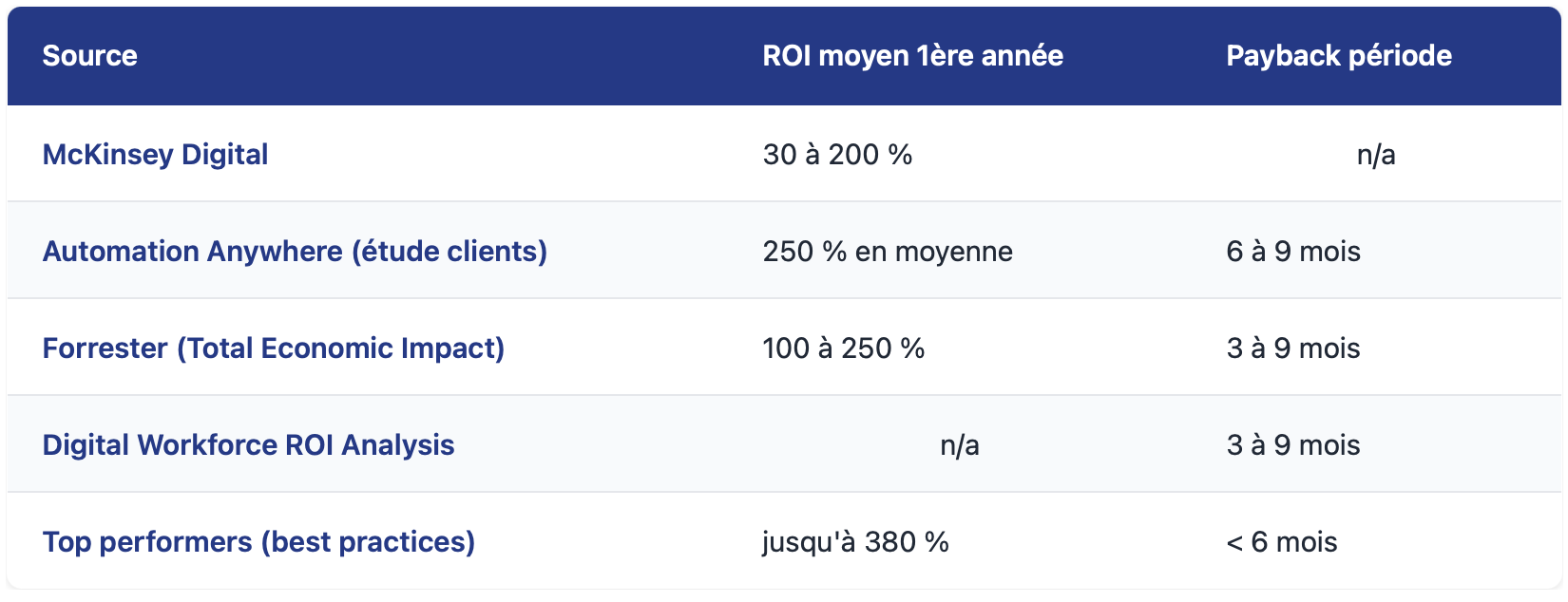
⚠️ These averages mask significant variation. Across all documented RPA projects, the average ROI is around 250% with a payback period of 14 months (CFB Bots), while the best-defined projects achieve a 380% ROI in less than 6 months. The difference lies in the quality of the initial planning, not in the technology itself.
In a cash-flow model, the break-even point is automatically lower (the initial investment is smaller), but the scope of coverage is also narrower. There are still few public benchmarks for this specific model because the segment is relatively new.
The pitfall to avoid: phantom ROI
Be careful with the equation “1 robot = 1 FTE saved.” It’s true on paper, but not in real life. Why? Because we almost never lay off an employee whose tasks have been automated. We just give them new ones.
True ROI is measured by:
- Freeed-up capacity (the employee performs higher-value tasks)
- Volume processed (we are handling the growth without hiring)
- Quality (zero data entry errors = zero rework)
- Processing time (what used to take hours is now handled in near real time)
- Compliance (according to Forrester research, RPA reduces audit preparation time by up to 45%)
Calculating ROI solely in terms of "saved FTE" underestimates the actual impact.
6. Overview of RPA Tools in 2026
The market has stabilized. Here's who does what, and for whom.
The 3 main categories of tools
Category 1 — Consumer-facing no-code platforms (Zapier, Make, IFTTT)
Who it's for: Small businesses, non-technical teams, rapid prototyping. Strengths: Up and running in a few hours, no developers required, extensive integration catalog. Limitations: Costs skyrocket at high volumes (Zapier charges per task), no desktop RPA, no enterprise management.
Family 2 — The Microsoft Ecosystem (Power Automate)
Who it's for: Companies already using Microsoft 365. Strengths: Native integration with Teams, SharePoint, Outlook, and Excel; free desktop RPA in Windows 10/11; reasonable pricing ($15/user/month for the Premium version). Limitations: Lock-in to the Microsoft ecosystem; costs that rise quickly with unexpected bots ($150–$215/bot/month) and advanced modules (AI Builder, Process Mining).
Category 3 — RPA pure players (UiPath, Blue Prism, Automation Anywhere)
Who it's for: Large enterprises with legacy systems (mainframes, older applications without APIs). Strengths: Mature RPA, enterprise-grade capabilities, centralized management of hundreds of robots. Limitations: Opaque pricing beyond the entry-level tier (Basic starting at $25/month for self-service, but Standard and Enterprise available only by quote, with robots and users billed separately), complex implementation, and oversized for the needs of small and medium-sized businesses.
French and European solutions
When it comes to data sovereignty and the GDPR, several options are emerging:
- n8n (German-based, and therefore EU-compliant): popular among technical teams for being open-source and self-hostable. Free for self-hosted versions; starting at €20/month for cloud-based versions.
- FlexFlow: a SaaS orchestration and automation platform developed by IT Systèmes (group). Designed for companies that want a platform they can use on their own, with over 300 native connectors, no-code RPA, and OCR + AI for document extraction. Hosted in France (OVH), GDPR-compliant, and in the process of obtaining ISO 27001 certification. Three pricing plans: Essential (€990/month), Pro (€1,990/month), and Enterprise (€3,990/month). 15-day free trial.
- Save Time Factory: also published by IT Systèmes, but it takes a radically different approach: a turnkey automation service with support included in the subscription. The target audience: small businesses, SMEs, professional firms, and associations that do not have an in-house technical team. Pricing per data flow: €19.90/month for the first flow (source A → source B), €4.90/month per additional source. Setup is billed at €170/hour (excluding tax) (3 hours on average per process, with a sliding scale down to €100/hour depending on volume). Key differentiator: Robot Clic OCR technology allows you to connect even software without an API. Hosted in France, native GDPR compliance, no commitment required.
How do you choose between FlexFlow and Save Time Factory? The distinction is clear: if you have an in-house technical team and want to manage your automation yourself, go with FlexFlow. If you don’t have an in-house team and want everything handled for you (from mapping to maintenance), go with Save Time Factory.
The "hosting in France/the EU" requirement will become a strategic factor in 2026, particularly for sensitive sectors (healthcare, legal, finance) where data must not leave the EU.
The real question to ask
Before choosing a tool, ask yourself this question: “Do we have a technical team capable of configuring, maintaining, and debugging this tool in-house?”
- If so → Zapier, Make, n8n, or FlexFlow are good options for you. You retain control, and you pay less upfront.
- If not → choose a turnkey solution that includes implementation services (Save Time Factory, Power Automate implementation with an integrator, or UiPath with a partner).
The worst decision: setting up Zapier without anyone to maintain it. After six months, the workflows start breaking one after another, and no one knows why.
7. 5 Mistakes to Avoid
We’ve seen a lot of RPA projects come and go. The failures all follow a similar pattern. Here are the five classic pitfalls.
Mistake 1 — Automating the wrong process
This is the number one mistake. Before automating, simplify the process. If your employees go through 12 steps to enter an invoice—five of which are outdated (“that’s just how we’ve always done it”)—automating all 12 steps will result in a system that simply repeats the inefficiency at a faster pace.
The rule: Ask someone with a fresh perspective to map out the process, identify what can be eliminated or simplified, and then automatewhat remains.
Mistake 2 — Tackling the wrong case first
For your first RPA project, don’t choose the most complex or strategic process. Choose the one with the best impact-to-effort ratio:
- Moderate volume (several dozen to 200 cases per day)
- The process has been stable for at least 12 months
- No complex business variability
- Motivated and available business sponsor
Successfully completing a first project in 2 to 3 months generates more value than an ambitious 9-month project that fails.
Mistake 3 — Underestimating the importance of maintenance
Many companies calculate ROI based solely on the initial project, without budgeting for the 15 to 20 percent annual cost requiredto keep the robots running. The result: 18 months later, nothing works anymore, no one knows why, and the initial investment is lost.
The rule: From the initial briefing onward, include a maintenance budget in your business plan, and determine whether your in-house team or an external service provider will be responsible for this maintenance.
Mistake 4 — Confusing RPA with AI
We’re bringing this up again because it’s crucial. If your use case requires judgment—such as assessing a complex request, understanding natural language, or handling unprecedented scenarios—RPA alone won’t cut it. You’ll need an AI layer.
On the other hand, if you just need to automate a well-defined, repetitive task, don’t overcomplicate things with generative AI —it’s more expensive, slower, and riskier (hallucinations).
The rule: Identify the need before choosing the technology.
Mistake 5 — Not involving the operational teams
RPA directly impacts employees' daily lives. If you roll it out without involving them early on:
- You're missing the nuances of the business that only those on the front lines understand
- You're causing concern ("Will I be replaced?")
- You run into passive resistance (people always come up with a thousand reasons why it won't work)
The rule: Develop the project in collaboration with the teams on the ground. Present RPA as a tool that frees them from tedious tasks, not as a tool that replaces them. Measure and celebrate the gains together.
8. How to Get Started in 6 Steps
A successful RPA project always follows the same sequence. The timelines provided are average market timelines observed in small and medium-sized businesses.
Step 1 — Process Mapping (2 to 4 weeks)
List all the repetitive processes carried out in your company. For each one, measure:
- Monthly volume
- Average processing time
- Stability (Has the process changed in the past 12 months?)
- Current error level
- Annual labor costs (full-time equivalents)
-
Step 2 — Prioritization (1 to 2 weeks)
Rank the processes based on the ratio of business impact to implementation effort. The first project should be:
- Visible (teams will see the results quickly)
- Measurable (you'll be able to quantify the benefit)
- Achievable (not too ambitious, not too complex)
-
Step 3 — Defining the scope of the first case (3 to 4 weeks)
For the selected process, document the following in detail:
- The trigger (what sets the process in motion?)
- The steps (who does what, and in what order)
- Exceptions (what could go wrong?)
- The tools involved (software, files, APIs—whether available or not)
- Success criteria (how will we measure whether it works?)
Step 4 — Selecting the tool (1 to 2 weeks)
Based on the scope, select the appropriate RPA tool. Criteria:
- Compatibility with your existing stack
- Skills available in-house or through a partner
- Budget for licensing, deployment, and maintenance
- Hosting and GDPR Compliance for Sensitive Data
Step 5 — Development and testing (duration varies depending on the approach)
The robot is designed, tested on real-world scenarios in a pre-production environment, fine-tuned, and validated by business users. This phase is the longest, but it is here that the reliability of the final result is determined.
The timeframes vary significantly depending on the approach chosen:
- Self-service approach (you set up Zapier, Make, or Power Automate on your own): 4 to 10 weeks depending on complexity, with a significant amount of trial and error and learning how to use the tool.
- Traditional vendor approach (external RPA integrator): 6 to 12 weeks; more predictable but with frequent back-and-forth communication.
- Industrialized platform approach (FlexFlow and equivalent solutions): According to the official FlexFlow website, the average deployment time is two days for standard cases, thanks to over 300 pre-configured connectors and over 50 template scenarios. This speed is due to the full standardization of the technical building blocks.
- Turnkey approach (Save Time Factory and similar offerings): According to the official Save Time Factory website, the average time to set up a process is 3 hours, with the system up and running from day one. This speed is due to the fact that the service is entirely handled by the vendor’s experts (no need for the customer to learn how to use the tool).
This is the difference between having a custom kitchen built (whether you do it yourself or hire a contractor), choosing a modular kitchen to assemble yourself (SaaS platform), or ordering a fully equipped, turnkey kitchen (service that includes installation). All three approaches work—but the time and effort involved are on a completely different scale.
Step 6 — Deployment and Continuous Improvement (ongoing)
The robot is now in production, with performance metrics being tracked. We measure the volume of data processed, exceptions, and errors. We’re continuously improving the system to increase its autonomy. And most importantly, we’re documenting everything so the project can survive changes in the team.
Total timeline by approach (from scoping to production):
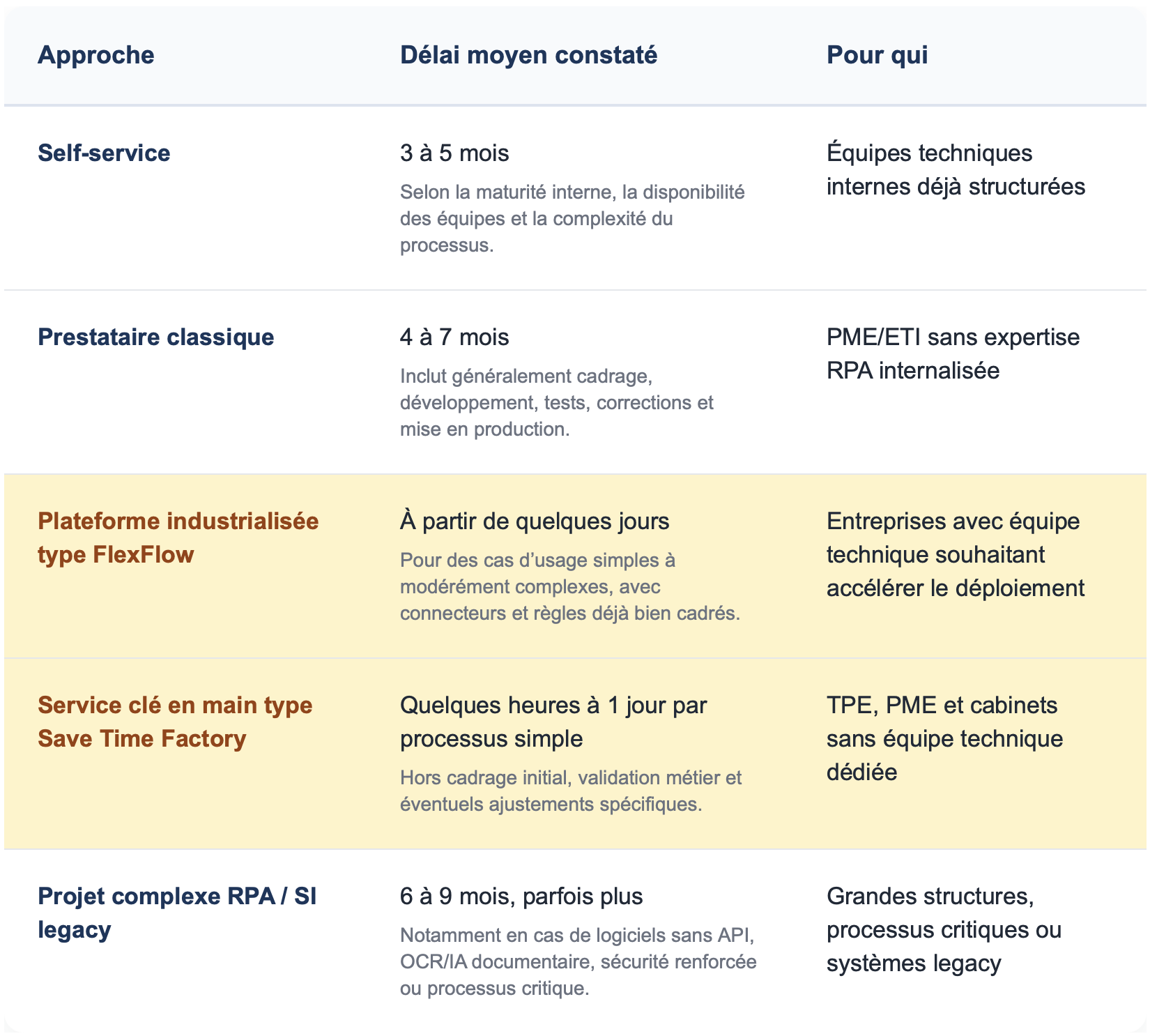
The difference between a self-service approach and an industrialized approach lies in the level of pre-configuration. A SaaS platform like FlexFlow eliminates the time typically spent configuring connectors (300+ ready-to-use) and selecting the right templates (50+ scenarios). A turnkey service like Save Time Factory also eliminates the time needed to learn the tool—you literally don’t have to do anything; the provider handles everything. For a precise quote tailored to your situation, requesting a quote will provide you with a firm timeline.
See our turnkey RPA automation approach
9. Frequently Asked Questions
Are RPA and automation the same thing?
Not exactly. Automation is a broad term that encompasses anything that automates a process (scripts, API integrations, RPA, AI). RPA is a specific type of automation that interacts with the user interfaces of existing software without modifying the software itself.
Will RPA replace my employees?
No—not in the vast majority of cases. RPA frees up human time spent on repetitive, low-value-added tasks, allowing that time to be redirected toward more strategic initiatives. Companies that deploy RPA to cut jobs generally see negative outcomes: demotivation, passive sabotage, and a loss of business expertise.
How long does it take to see the first results?
This depends heavily on the approach chosen. Whether you opt for self-service or work with a traditional integrator, expect 3 to 5 months from project kickoff to the first bot going live. With a standardized platform like FlexFlow, the vendor claims an average deployment time of 2 days for standard cases, thanks to over 300 native connectors and 50+ pre-configured scenarios. With a turnkey service like Save Time Factory, the vendor claims an average setup time of 3 hours per process, with the system operational from day one—as the service is fully delivered by the vendor’s experts. The exact timeline depends on the complexity of the case—requesting a quote will provide a firm estimate.
According to industry benchmarks (McKinsey, Forrester, Automation Anywhere), the average return on investment is achieved within 3 to 9 months after going live, with first-year ROI ranging from 30% to 200% depending on the case. The best-managed projects achieve profitability in less than 6 months.
Is it possible to implement RPA without an in-house developer?
Yes, provided you choose the right tool and the right partner. Modern no-code tools (Make, Zapier, Power Automate Cloud) allow trained business users to set up simple automations. For complex cases (desktop RPA on legacy software, IPA with AI), you’ll need to either hire someone or rely on a specialized service provider.
Is RPA GDPR-compliant?
Yes, but it depends on the tool you choose and where it's hosted. U.S.-based tools (Zapier, UiPath Cloud) generally host data in the United States, which poses a problem for sensitive data. European solutions (Make, hosted in the Czech Republic) or French solutions (FlexFlow and Save Time Factory, both published by IT Systèmes and hosted in France; n8n self-hosted) guarantee EU hosting and native GDPR compliance. This should be evaluated based on your industry.
What happens if the target software changes its interface?
The robot can break down. This is a reality of RPA: it depends on the stability of the interfaces it interacts with. That is why maintenance accounts for 15 to 20% of the initial cost each year. Modern tools incorporate visual AI to adapt to minor changes (such as a button being moved), but a complete redesign of an interface usually requires the robot to be re-configured.
RPA or AI agent: Which should I choose in 2026?
It depends on the process to be automated. Use RPA if the process is stable, structured, high-volume, and has clear rules. Use an AI agent if the process requires judgment, natural language understanding, or needs to adapt to a variety of scenarios. Often, the best solution in 2026 is a combination of both within the same workflow.
What is the minimum budget needed to get started?
This depends heavily on the pricing model you choose. With a pay-as-you-go model (such as Save Time Factory), you can start for as little as a few hundred euros per year to automate a simple initial process, including setup services. With a traditional project model (integrator + platform license), expect to pay between €10,000 and €40,000 fora well-defined initial project that includes scoping, development, testing, and deployment. The recurring monthly cost (license + basic maintenance) then ranges from a few dozen to a few thousand euros, depending on the volume, the tool, and the model chosen.
Does the executive committee need a sponsor?
Ideally, yes. Without a sponsor on the executive committee, RPA projects tend to stall: difficulties in getting operational teams on board, budget cuts following a tough first quarter, and shifting priorities. A sponsor (CFO, HR Director, or COO, depending on the scope) ensures the project’s longevity and commitment.
How do you measure the success of an RPA project?
Four metrics to track:
- Volume processed by the robot (number of cases per day)
- Autonomy rate (% of cases processed without human intervention)
- Time saved (hours saved per month)
- Quality (error rate vs. previous period)
Don’t just measure financial ROI—the capacity you free up and quality matter just as much.
RPA is neither a revolution nor a fad. It is a mature technology that solves a real-world problem: automating repetitive tasks that no human should have to perform. When used properly, it frees up valuable time and makes critical processes more reliable. When misused, it becomes a graveyard of broken robots that no one dares to touch.
Market benchmarks for 2026 confirm this: an average ROI of 250% and a payback period of 6 to 9 months for a well-defined project. But behind this average lies a wide range of variation. The difference comes down to three things: choosing the right initial use case, planning for maintenance from the outset, and getting the operational teams on board.
Further information
If you're considering an RPA project for your company, here are some helpful resources from IT Systèmes:
- See our Automation and RPA solution
- Learn about our approach to AI and automation
- Understanding the Difference Between AI Agents and Chatbots
- How much does an AI agent cost for a company?
Do you have a process in mind that you’d like to automate? Spend 30 minutes with an IT Systems expert to determine if your project qualifies and estimate the potential savings. Schedule an appointment.
Sources and benchmarks
This article draws on the following public sources for its market figures:
- UiPath Pricing: Microsoft Learn, AIMultiple Research, AIMultiple RPA Pricing Comparison (Updated for 2025–2026)
- Power Automate Pricing: Microsoft Publisher Pages, AIMultiple Research (updated February–March 2026)
- Pricing for Make, Zapier, and n8n: respective provider websites (April 2026)
- FlexFlow and Save Time Factory pricing: official publisher pages (accessed in May 2026)
- RPA implementation costs (project model): SCIMUS 2025, Perimattic 2026, EasyData 2026, AutomateNexus 2026, ByteScout
- ROI and market payback: McKinsey Digital, Forrester Total Economic Impact (Automation Anywhere and SS&C Blue Prism studies), Deloitte Global RPA Survey, Ramamtech RPA Statistics 2026
- Invoice Processing Costs: APQC Benchmarking Studies 2024–2025
- RPA maintenance (15–20% of the initial cost): SCIMUS 2025, EasyData 2026
Methodological note: Most RPA cost benchmarks come from North American sources. The figures are indicative and may vary depending on the geographic region, the actual complexity of the processes, and the profile of the service providers selected.




.svg)